
Participant
September 17, 2022
Answered

Issue on Window arrangement

  • September 17, 2022
  • 1 reply
  • 191 views

So I was making an animation, and I went to the window with things like assets, library, etc. on the right. For some reason (idk how) I managed to remove it. When I managed to get it back, the window, (formerly the one on the right) covered my WHOLE entire screen, and minimized the timeline window on the bottom. Is there a way to reset the window arrangement to default settings (as they were when I installed it?)
    This topic has been closed for replies.
    Correct answer n. tilcheff

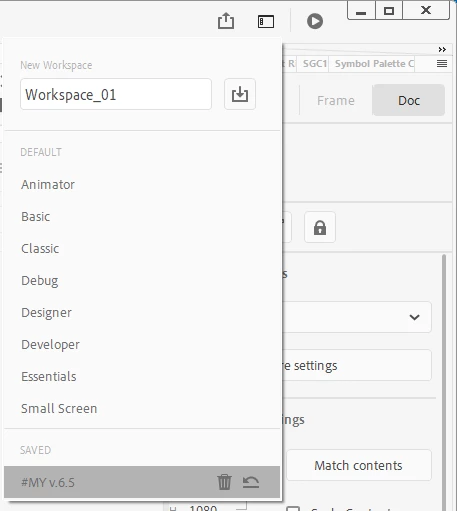
    At the top-right you will find the Workspace button:

    1 reply

    n. tilcheff
    n. tilcheffCorrect answer
    Legend
    September 18, 2022

    At the top-right you will find the Workspace button:

    Nick - Character Designer and Animator, Flash user since 1998 | Member of the Flanimate Power Tools team - extensions for character animation
    Participant
    September 18, 2022

    Thank you! Some of them weren't the exact placement but I just had to delete a few windows and it was back to normal.