
Participating Frequently
April 6, 2023
Answered

Issue with editing a group or a symbol

  • April 6, 2023
  • 1 reply
  • 301 views

Hello,
A have a simple but very annoying problem.
I use any drawing tool, and then I group it or convert it into a symbol. Right, very simple, the base !

BUT for some reason I can't explain, when I double-click on it to edit it, the rest of my composition is not shown in low opacity as usual (I'm sorry for may bad english, I hope you will understant what I mean).
For exemple I draw a character with black strokes, on a black strokes background. Then I want to edit my character by double-clicking it. But the strokes of my background remain black, which makes very hard to edit my character comfortably.
Do you have any ideas ? I've already tryied to relaunch Animate and also my computer, Animate is up to date…
    This topic has been closed for replies.
    Correct answer n. tilcheff

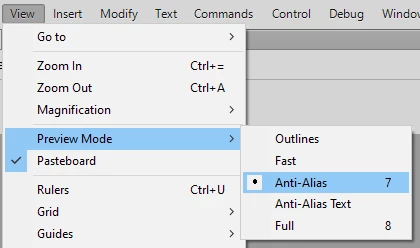
    Most likely you have switched to Full Preview Mode without noticing.

    Switch back to Anti-Alias from the View menu:


    1 reply

    n. tilcheff
    n. tilcheffCorrect answer
    Legend
    April 6, 2023

    Most likely you have switched to Full Preview Mode without noticing.

    Switch back to Anti-Alias from the View menu:


    Nick - Character Designer and Animator, Flash user since 1998 | Member of the Flanimate Power Tools team - extensions for character animation
    Participating Frequently
    April 6, 2023

    Oh man, you made my day!!!! Thank you very much. I've been using Flash/Animate for a long time but I have to admit that I never look at those settings! Greetings