Issue with pencil tool and recognized lines
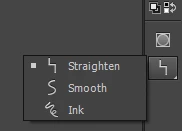
I started out by drawing the character I wanted to animate. I used the pencil tool, which snapped the line to similar looking geometric shapes. It took some trial and error but I managed to get the character looking the way I wanted. My next step was to give it color.
I tried the paint bucket, but this didn't do anything - probably there is a gap somewhere in the drawing, but I can't visibly find it anywhere. I'm guessing this has to do with the pencil tool, the drawing looks cohesive, but Animate assumes it to be various unlinked shaped, hence why the paint bucket doesn't work.
this gives me a whole lot of questions:
- what is the best workflow to do what I pretend?
- should I be using shapes and the morphing them into the figure I want so the paint bucket can be used?
- where I can get that loose, sketch like pencil that allows me to freely draw a crude character sketch? (the default pencil tool forces the loose line into a shape)
sorry if these questions are answered somewhere else, I'm a bit lost and stuck in my project and don't even know where to look for help to continue.
 AdChoices