
Inspiring
February 19, 2022
Answered

JavaScript code for Animate Color Effects > Advanced settings

  • February 19, 2022
  • 1 reply
  • 1386 views

Hi Animate support community,

Is there a way to access the Animate Color Effects > Advanced panel settings with JavaScript code?  I have an old project written in ActionScript 2.0 that I am trying to convert to HTML5 Canvas.  This project contains many images of flowers as movie clips and I want to change the color of these flowers from a button click.


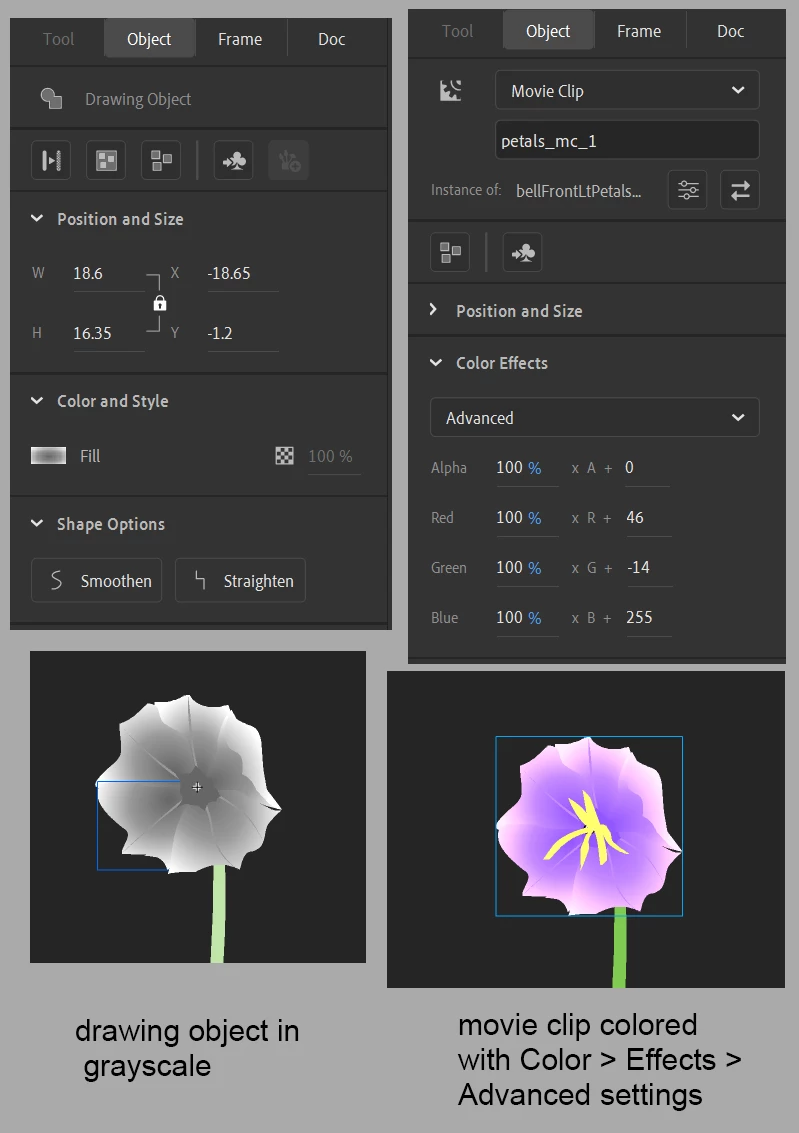
The base drawing objects of these flowers is done in grayscale gradients and the color is applied using the Color Effects > Advanced panel (see attached JPG) which shows the settings and results.  The code below doesn’t work to change the color because it’s not accessing the Color Effects > Advanced settings.  Is there a way to access these settings with JavaScript?  Thanks.

Zaffer

this.yellow_btn_1.addEventListener("click", change_color_yellow.bind(this));

function change_color_yellow()
{
	bellFrontLt.petals_mc_1.shape.graphics._fill.style = "rgb(255,255,0)";
}
This topic has been closed for replies.
Correct answer JoãoCésar17023019

Hi.


You need to apply a color filter. Like this:

var colorFilter = new createjs.ColorFilter(1, 1, 1, 1, 46, -14, 255, 0);
var bounds = this.flower.nominalBounds;

this.flower.filters = [ colorFilter ];

// in this case, the registration point of the flower is in the middle, so the initial x
// is half of the width to the left and the initial y is half of the height to the top
this.flower.cache(-bounds.width * 0.5, -bounds.height * 0.5, bounds.width, bounds.height);


I hope it helps.


Regards,

JC

1 reply

JoãoCésar17023019
Community Expert
JoãoCésar17023019Community ExpertCorrect answer
Community Expert
February 19, 2022

Hi.


You need to apply a color filter. Like this:

var colorFilter = new createjs.ColorFilter(1, 1, 1, 1, 46, -14, 255, 0);
var bounds = this.flower.nominalBounds;

this.flower.filters = [ colorFilter ];

// in this case, the registration point of the flower is in the middle, so the initial x
// is half of the width to the left and the initial y is half of the height to the top
this.flower.cache(-bounds.width * 0.5, -bounds.height * 0.5, bounds.width, bounds.height);


I hope it helps.


Regards,

JC

ZafferAuthor
Inspiring
February 19, 2022

Thanks so much for your help João.  Here's the code I used and it works!  I changed the color of the flower from lavender to yellow.

Zaffer


var colorFilter = new createjs.ColorFilter(1, 1, 1, 1, 255, 255, 0, 0);
var bounds = bellFrontLt.petals_mc_1.nominalBounds;

this.yellow_btn_1.addEventListener("click", change_color_yellow.bind(this));

function change_color_yellow()
{
	alert("yellow button clicked");	
	bellFrontLt.petals_mc_1.x = 300;
	
	bellFrontLt.petals_mc_1.filters = [ colorFilter ];
	bellFrontLt.petals_mc_1.cache(-bounds.width * 0.5, -bounds.height * 0.5, bounds.width, bounds.height);	
}


JoãoCésar17023019
Community Expert
Community Expert
February 19, 2022

Hi.


Great!


You're welcome.


Where is bellFrontLt defined? If bellFrontLt is the name of a instance that is placed directly on the timeline where you script is, then you should refer to it using the this keyword: this.bellFrontLt.


Please let us know.


Regards,

JC