K7S
Inspiring
March 12, 2018
Answered

Javascript Meter (Click rapidly to fill meter)

  • March 12, 2018
  • 3 replies
  • 1327 views

Hi there,

I've been looking for a javascript resource that has a simple game mechanic. It was moderately easy to do in actionscript.

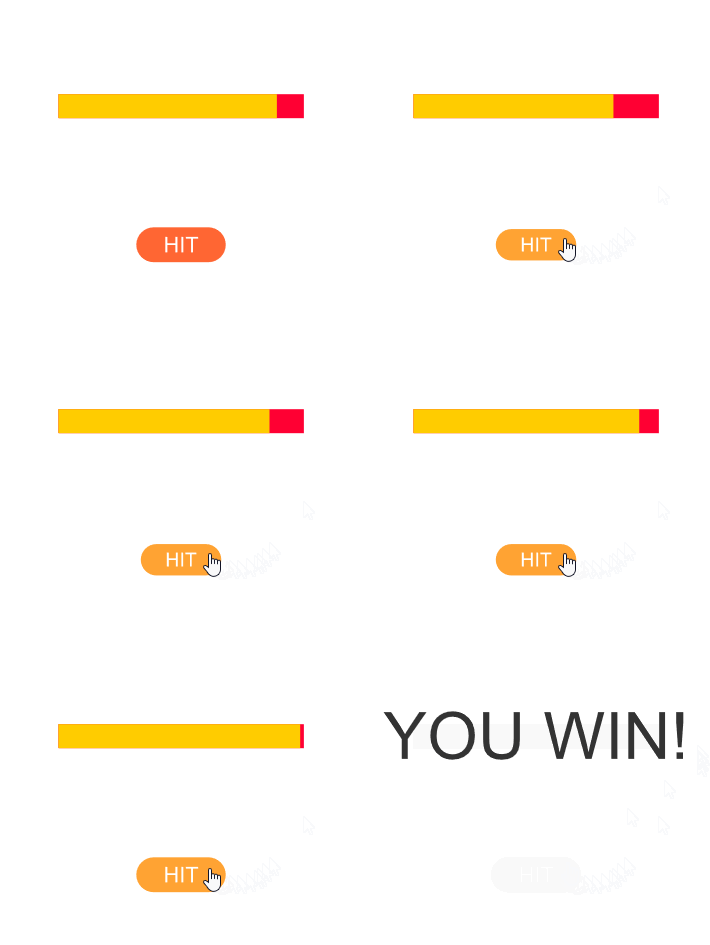
It is a a button and a meter, and when the button is pressed in rapid succession, it fills the meter.

If you do not press said button fast enough, or you delay, the bar drains and nothing is accomplished. But if the bar fills full, then gotoAndPlay some other frame or sequence.

It's a simple game mechanic really, used in many Flash games an era ago. It's been very hard to finding how to do this in Javascript. If anyone knows of some snippets I would surely appreciate it

This topic has been closed for replies.
Correct answer JoãoCésar17023019

Hi.

Here is my suggestion. Feel free to fix or improve in any way you want.

Preview:
Code:

var meterPower = 0.005;

var playerPower = 0.02;

var totalEnergy = 1 - meterPower;

var down = false;

var keys = {};

// keys used to raise the bar

var keyCodes =

{

    space:32,

    j:    74,

    k:    75

};

// press these keys in sequence to raise the bar

var keysSequence =

[

    keyCodes.j,

    keyCodes.k

];

var count = 0;

function resizeMeter(force)

{

    totalEnergy += force;


    if (totalEnergy < 0)

        totalEnergy = 0;

    else if (totalEnergy > 1)

        totalEnergy = 1;

}

function loop(e)

{       

    resizeMeter(-meterPower);   

    this.meter.top.scaleX = totalEnergy;


    if (totalEnergy >= 1 - meterPower)

    {       

        this.gotoAndStop("win");

        createjs.Ticker.off("tick", loop);

    }   

}

function hitHandler(e)

{

    resizeMeter(playerPower);

}

function keyDown(e)

{

    if(down)

        return;

    down = true;


    if (e.keyCode == keysSequence[count % keysSequence.length])

    {

        resizeMeter(playerPower);

        count++;

    }       

    else

        count = 0;

}

function keyUp(e)

{

    down = false;   

}

this.startGame = function()

{

    this.stop();

    this.hitButton.on("click", hitHandler.bind(this));

    createjs.Ticker.on("tick", loop.bind(this));

    document.addEventListener("keydown", keyDown, false);

    document.addEventListener("keyup",   keyUp,   false);

}

this.startGame();

FLA download:

animate_cc_html5_meter.zip - Google Drive

Regards,

JC

EDIT: As suggested by @BallsDeepWeep, I've updated the FLA and code to add support for:

- key presses;

- key repetition prevention ("turbo" mode);

- keys sequence (e.g. press j, k, j, k...);

- fake loader.

3 replies

albertd9194959
Inspiring
March 13, 2018

Hmmm...another suggestion, pretty much same as above....

// Symbol name for meter fill button - fillerButton

// Symbol name for animated meter - meterFill

// Change scaleY to scaleX in order to change direction. Origon point relative to direction on edge.

// Var Setup

this.stop();

var root = this;

var fillerDropRate = 0.5; // 0 to 1, Higher Value, Higher Drop Rate.

var fillerButtonFillRate = 0.25; // 0 to 1, Higher Value, Higher Fill per click.

this.meterFill.scaleY  = 0;

//////-----/////

// Update

this.addEventListener("tick", fillerAnim);

function fillerAnim()

{

    if (root.meterFill.scaleY >= 0)

    {

    root.meterFill.scaleY -= (fillerDropRate / 10);

    }

}

//////-----/////

// Mouse Events

this.fillerButton.addEventListener("click", fillerButtonFill);

function fillerButtonFill()

{

    root.meterFill.scaleY += fillerButtonFillRate;

    if (root.meterFill.scaleY >= 1)

    {

    root.removeEventListener("tick", fillerAnim);

    root.fillerButton.removeEventListener("click", fillerButtonFill);

    alert("GotoAndPlay");

    }

}

K7S
K7SAuthor
Inspiring
March 13, 2018

Wow thank you guys so much.

Do you have the working file for this alternate one ?

Legend
March 12, 2018

It would help if you told us which part you can't figure out how to do.

Draw the meter?

Drain the meter?

Detect a mouse click?

Do something when it's full?

K7S
K7SAuthor
Inspiring
March 12, 2018

Hi Clay,

I don't know how to do any of those things in Javascript from scratch,, except the single click button to gotoAndPlay a frame.

I am asking how to build it all. If it's a significant amount of work, I would gladly commission one of you.

Reclaiming what we lost in transition from actionscript to javascript was pretty monumental, thanks for the help

JoãoCésar17023019
Community Expert
JoãoCésar17023019Community ExpertCorrect answer
Community Expert
March 13, 2018

Hi.

Here is my suggestion. Feel free to fix or improve in any way you want.

Preview:

Code:

var meterPower = 0.005;

var playerPower = 0.02;

var totalEnergy = 1 - meterPower;

var down = false;

var keys = {};

// keys used to raise the bar

var keyCodes =

{

    space:32,

    j:    74,

    k:    75

};

// press these keys in sequence to raise the bar

var keysSequence =

[

    keyCodes.j,

    keyCodes.k

];

var count = 0;

function resizeMeter(force)

{

    totalEnergy += force;


    if (totalEnergy < 0)

        totalEnergy = 0;

    else if (totalEnergy > 1)

        totalEnergy = 1;

}

function loop(e)

{       

    resizeMeter(-meterPower);   

    this.meter.top.scaleX = totalEnergy;


    if (totalEnergy >= 1 - meterPower)

    {       

        this.gotoAndStop("win");

        createjs.Ticker.off("tick", loop);

    }   

}

function hitHandler(e)

{

    resizeMeter(playerPower);

}

function keyDown(e)

{

    if(down)

        return;

    down = true;


    if (e.keyCode == keysSequence[count % keysSequence.length])

    {

        resizeMeter(playerPower);

        count++;

    }       

    else

        count = 0;

}

function keyUp(e)

{

    down = false;   

}

this.startGame = function()

{

    this.stop();

    this.hitButton.on("click", hitHandler.bind(this));

    createjs.Ticker.on("tick", loop.bind(this));

    document.addEventListener("keydown", keyDown, false);

    document.addEventListener("keyup",   keyUp,   false);

}

this.startGame();

FLA download:

animate_cc_html5_meter.zip - Google Drive

Regards,

JC

EDIT: As suggested by @BallsDeepWeep, I've updated the FLA and code to add support for:

- key presses;

- key repetition prevention ("turbo" mode);

- keys sequence (e.g. press j, k, j, k...);

- fake loader.

Joseph Labrecque
Community Expert
Community Expert
March 12, 2018

Do you have a sample of ActionScript code you used to use? A few of us could likely translate it easily enough with something to go on like that.

K7S
K7SAuthor
Inspiring
March 12, 2018

Ah. Joseph. I've leveraged many of your tutorials on the flagship online training sites. Thank you

I believe this is what it looks like in AS3:

myButton.addEventListener(MouseEvent.CLICK,clicked);

function (e:MouseEvent){

//do something when the button is clicked)

}

What I think it might look like in JS:

this.myButton.addEventListener("click",clicked.bind(this));

function (e){

//do something when the button is clicked)

}

function (e){

  this.myMovieClip.gotoAndStop(10);

}

And a better explanation;

Let's say there is a set number of clicks on a button or a movie clip, every time you reach x, y, z number of clicks it builds a meter in a separate movie clip. So the user can see the game is progressing.

After you reach "y" or "z" clicks, you then gotoAndPlay another frame.

I could give you an animate file of what this could look like. If that helps.