



Question
Jpeg images do not appear in images folder when I publish as spritesheets
Hi,
Just wanted to share and ask if you have experienced the same w the latest Animate version (v 20.0.3)? Whenever I publish, even if settings are on "BOTH" under format, i do not see the jpg spritesheets in the images folder.
In the output tab: it shows 4 bitmaps packed successfully (where 2 are PNGs and the other 2 are JPGs). Also showing that 2 spritesheets were generated.

But on the published files, only the PNG spritesheet is showing and the JPG sheet is missing.
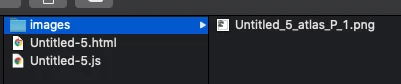
I have also tried importing to stage just 2 JPG images. None of them as a spritesheet appeared in the /images folder. Appreciate if you have any advise or any other comment in case I'm missing something on the publishing settings. Thanks!
J
 AdChoices