i've... i've done it! (?)
i've done it in a horrible, awful way. But i've done it.
The script is gross, and the method is gross, but by God, it works!
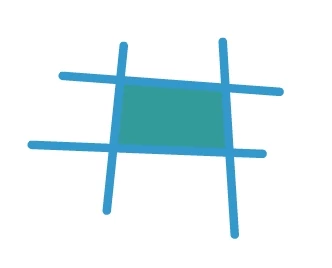
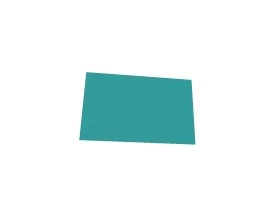
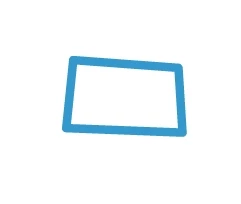
Essentially, to fill my empty shape, i turn it into a movieclip (grouping it might work, too?), draw a big filled rectangle behind it, select the rectangle's fill and delete it... leaving me with a filled shape. Then i get rid of the messy lines, stroke the clean shape, and delete the fill. It feels like cheating. But really, JSFL should be able to fill a shape a more normal way, so i don't feel too bad.
But check out the bizarre thing happening on line 75. If i don't set an iterator variable (that never gets used again) to frame.elements.length (or to "1"... i'm not sure which), the script doesn't work. i'm mystified. But it works, so i'm backing away slowly before the whole thing comes crashing down on me.
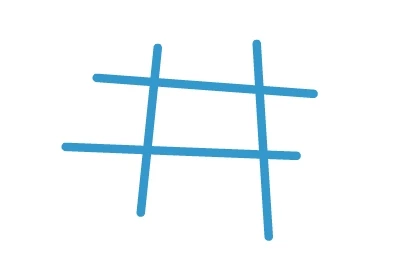
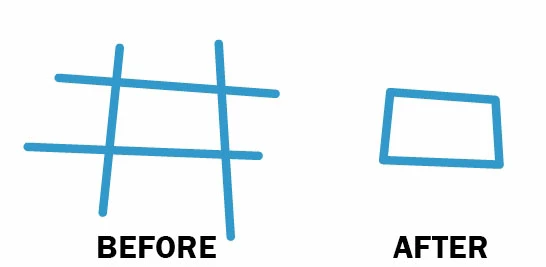
// This script lets me draw a "messy" box or shape
// with overshot, straggling ends.
// It gets rid of those loose ends.

an.outputPanel.clear();

// Declarations:
var dom = an.getDocumentDOM();
var tl = dom.getTimeline();
var layer = tl.layers[ tl.currentLayer ];
var frame = layer.frames[ tl.currentFrame ];

// Set a certain fill and stroke:
fill = dom.getCustomFill("toolbar");
fill.color = "#222221";
fill.style = "solid"
dom.setCustomFill(fill);

var stroke = dom.getCustomStroke("toolbar");
stroke.color = "#222221";
stroke.thickness = 12;
dom.setCustomStroke( stroke );

dom.selectAll(); // Select everything
if(dom.selection)
{
	if(dom.selection.length > 0)
	{
		// Artwork already exists on this layer.
		var doodleName1 = "doodle1234076894"; // Give it an improbable library name
		var doodle1 = dom.convertToSymbol("movie clip", doodleName1, "top left"); // Convert it to a MovieClip symbol to "protect" it
		dom.selectNone(); // Deselect the MovieClip
	}
}

fl.getDocumentDOM().addNewRectangle({left:0,top:0,right:1920,bottom:1080},0);	// Draw a bigass rectangle behind the MovieClip instance

// Iterate through the elements in the current frame of the current layer,
// and if it's the MovieClip instance, select it:
for( var i = 0; i < frame.elements.length; i++ )
{
	var elt = frame.elements[ i ];
	if(elt.elementType == "instance") elt.selected = true;
}

if(dom.selection)
{
	if(dom.selection.length > 0)
	{
		// The artwork was selected.
		dom.breakApart(); // Break it out of the MovieClip symbol
		dom.selectNone(); // Deselect it
	}
}

// Now, the artwork is sitting in front of the bigass rectangle fill. So it has "filled in" the inside of the messy shape.

dom.mouseDblClk({x:0, y:0}, false, false, false); // Double-click the rectangle outline
dom.deleteSelection(); // Delete it
dom.mouseClick({x:0, y:0}, false, false, false); // Click to select all the fill colour outside the messy shape
dom.deleteSelection(); // Delete the fill artwork. Now just the lines remain.

deleteLines(); // Delete all the lines! Now, just the shape's clean fill remains.

dom.selectAll();

var stroke = dom.getCustomStroke();
stroke.style = "solid";
stroke.color = "#3399cc";
stroke.thickness = 12;

var fill = dom.getCustomFill();
fill.style = "noFill";

i = frame.elements.length; // i have no idea why this line is here, but if i delete it, the script doesn't work.

dom.setCustomStroke( stroke );	// Stroke the shape
dom.setCustomFill ( fill ); // Fill the shape (with "noFill");

dom.selectNone();

dom.library.deleteItem(doodleName1); // Delete the temporarily encapsulated artwork from the library


function deleteLines()
{
	// Search the current frame for a stroke
	var element;
	var stroke;
	var i;
	var j;
	var len1;
	var len2;
	var edge;
	var theSelection;
	var newSelection = [];
	var vertex;

	// Loop through the elements in the current frame:
	len1 = frame.elements.length;
	for( i = 0; i < len1; i++ )
	{
		element = frame.elements[ i ];

		var didDeleteLine = false;

		if(element.elementType == "shape")
		{
			// This is a shape!
			var shape = element;

			// Loop through the edges in the shape:
			len2 = shape.edges.length;
			for( j = 0; j < len2; j++ )
			{
				edge = shape.edges[j];
				if(edge)
				{
					if(edge.stroke.color != undefined)
					{
						// This is a stroke!
						vertex = edge.getHalfEdge(0).getVertex(0); // Get the stroke's first vertex
						dom.mouseClick({x:vertex.x, y:vertex.y}, false, false, true); // Click it
						dom.deleteSelection(); // Get rid of it
						j--;
						didDeleteLine = true; // Flag this because there may be more strokes to delete
					}
				}
			}

		}
		return (didDeleteLine);
	}
}



 re-applies a "clean" stroke: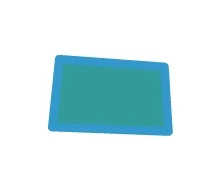
 AdChoices