
alexandre66
Participant
December 15, 2015
Answered

[JSFL] Having a linkage classname according to the movie clip name

  • December 15, 2015
  • 2 replies
  • 1335 views

Hello,

I have some issue doing this. As I'll be doing this for some times, I wanted to try a jsfl script instead of doing this manually each time.

My library will look like this every time.
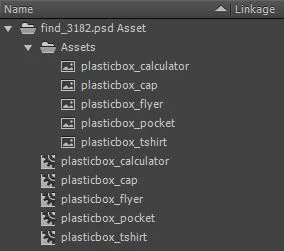
What I would like to have in the end:
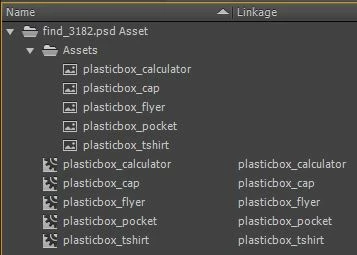
What I want is simple, I just want to take the name of each movie clip and paste it into the linkage attribute.

So getting the name was pretty easy, but as it was the full path, I needed to cut it, so I used substring.

But then, despite my several attempts, I can't manage to paste the name into the linkage attribute.

It doesn't want to take my last sentence: "fl.getDocumentDOM().library.items.className = newClassName;"

Any ideas?

Here is the code:

function init()

{

        fl.outputPanel.clear();

        var i = fl.getDocumentDOM().library.items.length;

        var lib = fl.getDocumentDOM().library;

        while(i--)

        {

                if(fl.getDocumentDOM().library.items.itemType=="movie clip")

                    {

                        var getName = fl.getDocumentDOM().library.items.name;

                        newClassName = getName.substring (20, getName.length);

                        fl.trace(newClassName);

                        fl.getDocumentDOM().library.items.className = newClassName;

                    }

                }

        }

init();

This topic has been closed for replies.
Correct answer alexandre66

Finally got my code working with some more lines.

Well, I just needed to add "item.linkageExportForAS=true;". Of course...

function init()

{

        var i = fl.getDocumentDOM().library.items.length;

        var lib = fl.getDocumentDOM().library;

        while(i--)

        {

            var item = lib.items;

            if(lib.items.itemType=="movie clip")

            {

                if(item.linkageExportForAS==false)

                {

                    var getName = lib.items.name;

                    newClassName = getName.substring (20, getName.length);    

                    item.linkageExportForAS=true;

                    item.linkageClassName=newClassName;                  

                }

            }

        }

}

init();

2 replies

alexandre66
alexandre66AuthorCorrect answer
Participant
February 9, 2016

Finally got my code working with some more lines.

Well, I just needed to add "item.linkageExportForAS=true;". Of course...

function init()

{

        var i = fl.getDocumentDOM().library.items.length;

        var lib = fl.getDocumentDOM().library;

        while(i--)

        {

            var item = lib.items;

            if(lib.items.itemType=="movie clip")

            {

                if(item.linkageExportForAS==false)

                {

                    var getName = lib.items.name;

                    newClassName = getName.substring (20, getName.length);    

                    item.linkageExportForAS=true;

                    item.linkageClassName=newClassName;                  

                }

            }

        }

}

init();

alexandre66
Participant
January 7, 2016

Well, nobody has a sligth idea?