24styx
Participating Frequently
October 1, 2021
Answered

JSFL: How to keep the first keyframe and clear the rest of the keyframes, in selected layer?

  • October 1, 2021
  • 1 reply
  • 613 views
Currently making my first script to automate some tasks in Adobe Animate. One of the steps is keeping my selected layers' first keyframe, while clearing out the rest that follow after. How would I go about asking the computer to do this?
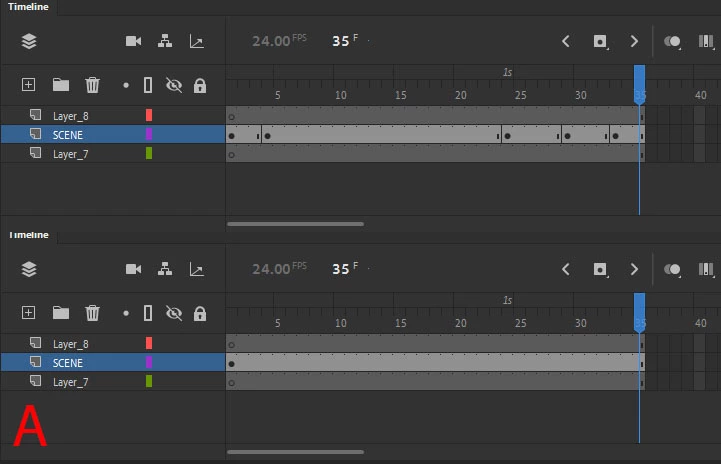
 

Picture "A" is what I'd like to achieve, picture "B" is what I get when I run:

an.getDocumentDOM().getTimeline().clearKeyframes();


How would I break this down further? (super beginner, haha!)

This topic has been closed for replies.
Correct answer kglad

try


fl.getDocumentDOM().getTimeline().clearFrames(1,fl.getDocumentDOM().getTimeline().getSelectedLayers()[0].frames.length);

1 reply

kglad
Community Expert
kgladCommunity ExpertCorrect answer
Community Expert
October 2, 2021

try


fl.getDocumentDOM().getTimeline().clearFrames(1,fl.getDocumentDOM().getTimeline().getSelectedLayers()[0].frames.length);

24styx
24styxAuthor
Participating Frequently
October 2, 2021

Thank you, this works! I've toggled the "1" to "2" and it fits my purposes nicely. 

I've tried doing something similar, like:


fl.getDocumentDOM().getTimeline().clearKeyFrame(2, an.getDocumentDOM().getTimeline.frameCount);


However that fell flat (the error I then got was 2 wasn't valid, which was confusing). May I ask what's the distinction between using a frameCount and frameLength integers? Genuinely curious! 


kglad
Community Expert
Community Expert
October 3, 2021

you're welcome.


i don't know what you mean by frameLength.  is that a property of some jsfl class? 


if you're looking at frames.length, there's a big difference.  all arrays (including ,fl.getDocumentDOM().getTimeline().getSelectedLayers()[0].frames) have a length property yielding the number of items in the array).