
Answered
Layer parenting scale glitch
I think I maybe going insane.
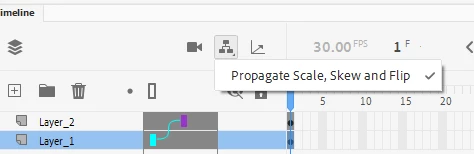
I have two symbols parented, square is the parent, circle is the child. Wherever I position the square, the child will follow. Now I SWEAR this was the same rule when it came to scaling as well, because I've used this method whenever I want to scale multiple symbols at once. Now when I scale the square, the cirlce remains the same size but just moves its position. See video below.
Did I do something wrong? Did I activate something on accident? Is Adobe gaslighting me at this point? IDK! I've updated AA to the latest 22.0.7 today and still no luck. I downgraded back to 21.0 and it doesn't work either? I've tried this method in After Effects and it works as it should. What's going on?


 AdChoices