
Layer Titles Not Displaying Properly
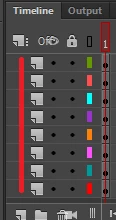
I've searched to see if people are having similar issues to this, but I have not found anything. As you can see, the layers do not have a label for me to title them. (The red line of course indicates where the titles would normally be.) As you can see above and below it , it's causing buttons to overlap. I have been trying to ignore this problem, but this also affects reordering layers and things like that. It makes it a much more tedious task to work with layers and I'm wondering if someone can help me figure out what's going on? This is the only issue I'm having. I'm using Animate CC 2018, but this issue has been occurring since the 2015 version. I'll uninstall all Adobe and reinstall it to see if that fixes it if I have to, but my internet isn't the best the world has to offer and would like to try something else first if anyone knows a trick or two about it. Will reinstall it if I have to, though. Just takes hours to do it, and I'm really trying to get some work done. :S Just seems like it would be a simple fix, you know?
TL;DR: Layer names not showing. Causing issues with overlapping and layer reordering. Whatdo?
Thank you so much in advance. 
 AdChoices