


rickhino
Inspiring
March 3, 2021
Answered

Learning to Convert Flash to HTML5 Part 3

  • March 3, 2021
  • 1 reply
  • 476 views

Just when I think I have it figured out . . . .

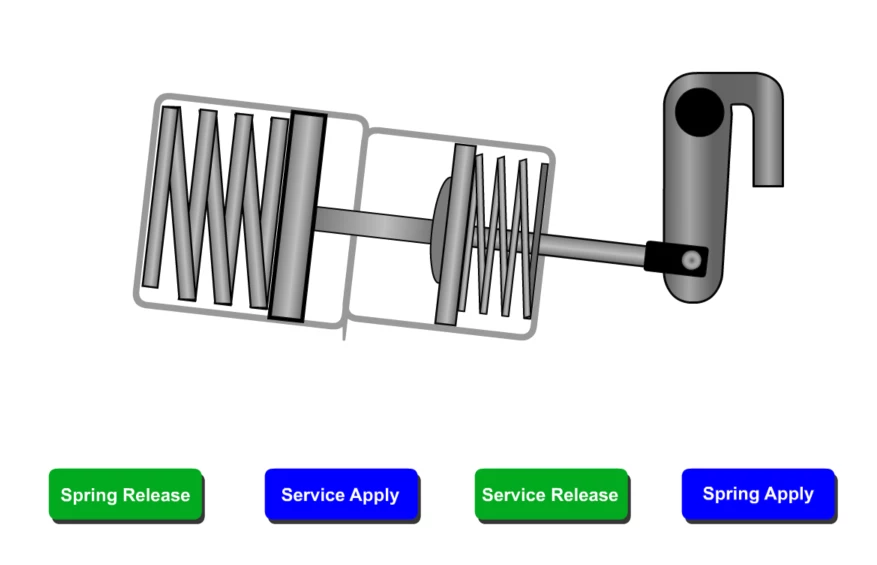
The attached is a very simple animation with a single movieclip and four buttons.  So there are four event listeners calling four functions telling the movie to play at a certain spot.  To make sure learners play it sequentially, only the button they should play next is on the stage.  The first button knows it's a button but doesn't perform the assigned command.  I'm hoping somebody can tell me what I'm doing wrong.

It's less than 40 lines of code.  Any help would be greatly apprecited!
 

this.BrakeChamber.gotoAndStop("On");
this.SpringApply.alpha=0;
this.ServiceApply.alpha=0;
this.ServiceRelease.alpha=0;

SpringRelease.addEventListener("click", SpringReleasing.bind(this));

function SpringReleasing(e)
{
this.BrakeChamber.gotoAndPlay("On");
this.SpringRelease.alpha=0;
this.ServiceApply.alpha=1;
}

SpringApply.addEventListener("click", SpringApplying.bind(this));

function SpringApplying(e)
{
this.BrakeChamber.gotoAndPlay("SBOff");
this.SpringApply.alpha=0;
this.SpringRelease.alpha=1;
}

ServiceApply.addEventListener("click", ServiceApplying.bind(this));

function ServiceApplying(e)
{
this.BrakeChamber.gotoAndPlay("Applied");
this.ServiceApply.alpha=0;
this.ServiceRelease.alpha=1;
}

ServiceRelease.addEventListener(MouseEvent.CLICK, ServiceReleasing.bind(this));

function ServiceReleasing(e)
{
this.BrakeChamber.gotoAndPlay("Release");
this.ServiceRelease.alpha=0;
this.SpringApply.alpha=1;
}

This topic has been closed for replies.
Correct answer JoãoCésar17023019

Hi.


There is no MouseEvent.CLICK in HTML5 Canvas unless you define it yourself.


So if you replace MouseEvent.CLICK by "click" your could should work.


Also, it's more efficient for performance if you use the visible property to hide an instance instead of using alpha.


Please let us know.


Regards,

JC

1 reply

JoãoCésar17023019
Community Expert
JoãoCésar17023019Community ExpertCorrect answer
Community Expert
March 3, 2021

Hi.


There is no MouseEvent.CLICK in HTML5 Canvas unless you define it yourself.


So if you replace MouseEvent.CLICK by "click" your could should work.


Also, it's more efficient for performance if you use the visible property to hide an instance instead of using alpha.


Please let us know.


Regards,

JC

rickhino
rickhinoAuthor
Inspiring
March 3, 2021

I see that I missed one, so I changed it.  The buttons still don't work.  The cursor changes to a hand, so the browser knows it's a button but no action occurs.  I was hoping to attach the file, but Adobe says it's not what it is.  LOL


I'll have to learn the code for hide and unhide eventually.


I apprecaite the help!

JoãoCésar17023019
Community Expert
Community Expert
March 3, 2021

It's also my fault. I missed the lines in which you add the listeners. To access the button instances you must use the this keyword. For example:

this.SpringRelease.addEventListener("click", SpringReleasing.bind(this));


And for your case, I think it's better to store the buttons in an array and make use of the data property from the on method. Like this:

this.buttons = [ this.SpringRelease, this.ServiceApply, this.ServiceRelease, this.SpringApply ];
this.buttons[1].visible = this.buttons[2].visible = this.buttons[3].visible = false;

this.playAnim = function(e, data)
{
	this.BrakeChamber.gotoAndPlay(data.label);
	e.currentTarget.visible = false;
	
	if (data.next)
		this.buttons[data.next].visible = true;
};

this.buttons[0].on("click", this.playAnim, this, false, { label: "On", next: 1 });
this.buttons[1].on("click", this.playAnim, this, false, { label: "SBOff", next: 2 });
this.buttons[2].on("click", this.playAnim, this, false, { label: "Applied", next: 3 });
this.buttons[3].on("click", this.playAnim, this, false, { label: "Release" });


I hope this helps.


Regards,

JC