
Line segment selection working differently than expected
The ability to select and "trim" a small part of a line that intersects another line is a critical drawing feature in Animate. I've gotten used to using it at school, but I can't seem to figure out how to configure it to work the same way on my home computer.
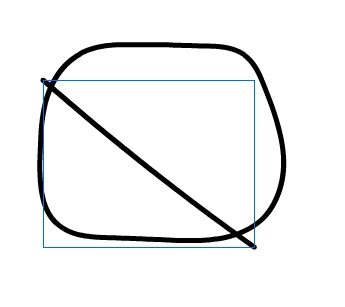
I can't screenshot what I can't make happen, but when I use the selection tool (V) on the image above, I expect to be able to select at least five distinct parts: the two halves of the circle, the two ends of the line, and the middle of the line. Instead there are only two, the line and the circle, which are enclosed in rectangular boxes instead of highlighted with a dotted texture. If I erase part, it still only recognizes two objects. When I ctrl+A or click between frames, everything in the frame becomes selected the same way, with a box. The behavior is the same whether I draw with the Brush, Classic Brush, Pencil, or any of the shape tools.
I fully expect the answer to be obvious and make me feel stupid, but I'm not doing anything differently than I do at school, and I can't figure out what's wrong. Any help is appreciated.


 AdChoices