Participant
May 7, 2019
Answered

Lining up out of sync audio in the Animate CC timeline?

  • May 7, 2019
  • 1 reply
  • 2253 views

I'm using ActionScript 3 and have several key frames that make up the image sequence of a video clip; I have now attempted to add the sound by exporting the video clip as a WAV file and importing it to the library. Back on the timeline, I have created an extra layer in preparation for the sound, however, once I drag the audio clip onto the timeline, the audio is a few seconds out of syn whenever I 'test' movie or scene.

Thanks

This topic has been closed for replies.
Correct answer n. tilcheff

Hi mate,

Did you choose 'stream' as the setting for your audio?

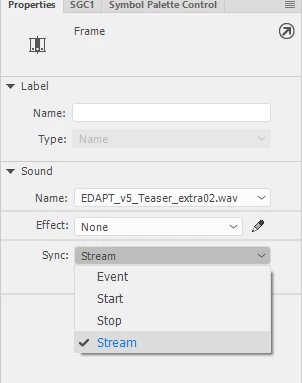
If not from the Property Inspector drop-down in Sound > Sync, choose Stream.

If the file is a long one and you export audio as MP3 you will encounter progressive error that gets more prominent the further you go. Choose ADPCM with the highest quality instead (or possibly RAW).

Hope this helps!

NT

1 reply

n. tilcheff
n. tilcheffCorrect answer
Legend
May 7, 2019

Hi mate,

Did you choose 'stream' as the setting for your audio?

If not from the Property Inspector drop-down in Sound > Sync, choose Stream.

If the file is a long one and you export audio as MP3 you will encounter progressive error that gets more prominent the further you go. Choose ADPCM with the highest quality instead (or possibly RAW).

Hope this helps!

NT

Nick - Character Designer and Animator, Flash user since 1998 | Member of the Flanimate Power Tools team - extensions for character animation