
May 21, 2019
Answered

Links keep opening in frame (when using _self)

  • May 21, 2019
  • 2 replies
  • 4416 views

The below code is a sample of how I’ve set up my link buttons in my HTML Canvas file.

I then publish as a OAM file. Then I insert the OAM into Dreamweaver.

Then publish out of Dreamweaver and/or Put up onto the actual server.

Originally the _blank were _self (also tried _parent and _top), all of them (_self, _parent and _top) kept erroneously opening in a frame (image below)?

Why is it behaving like this, when my old SWF site only used _self it worked perfectly (when Flash is enabled of coarse).

_blank is used now only because the others won’t work, but I would like it to behave like it used to, where it would stay on the current window/tab?

What am I doing wrong?

The files I’m using are available for download below.

Thanks.

_self, _parent and _top causes the urls to load in a separate frame?
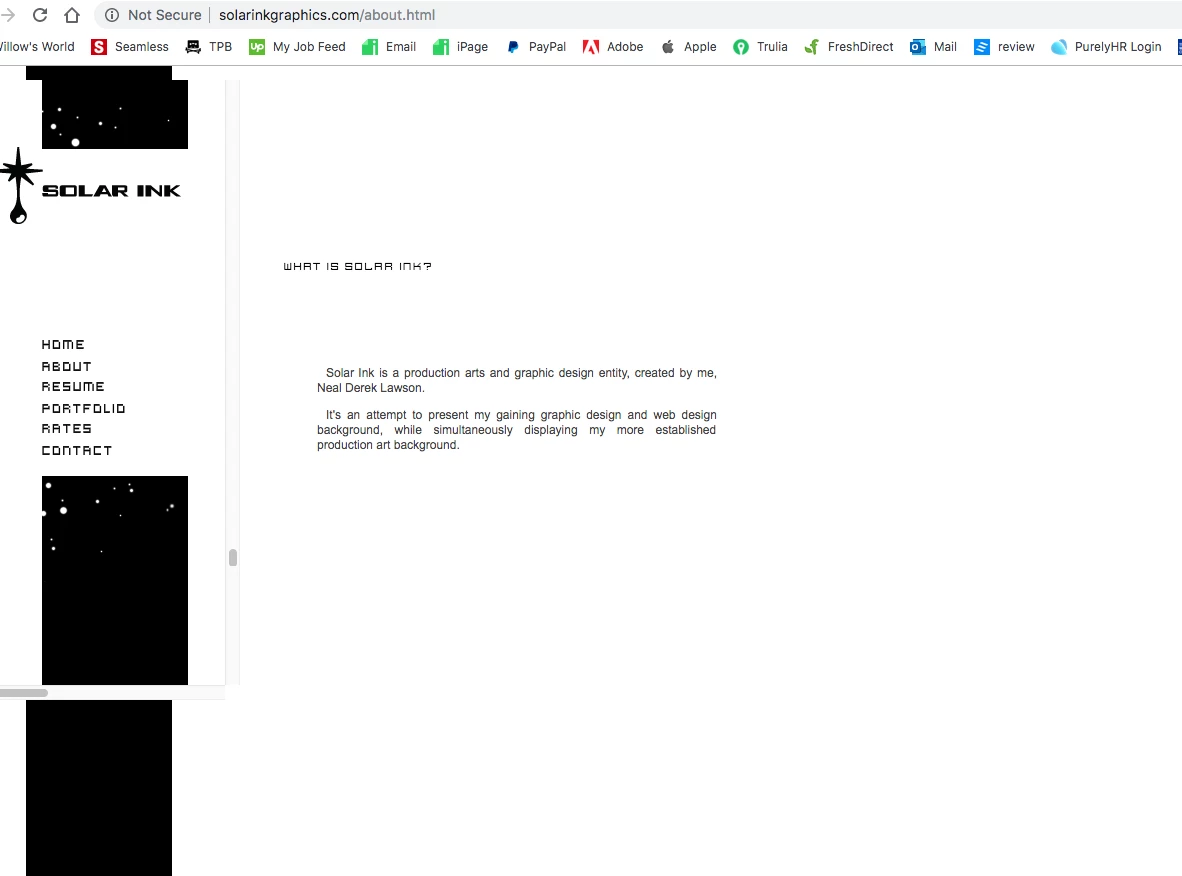
Sample of my current link setups (originally it was _self😞

//  5.2 PRINT submenu button link

this.nPrint_btn.addEventListener("click", fl_ClickToGoToWebPage0502);

function fl_ClickToGoToWebPage0502() {

window.open("http://solarinkgraphics.com/#printAnchor", "_blank");

};

//  5.3 WEB submenu button link

this.nWeb_btn.addEventListener("click", fl_ClickToGoToWebPage0503);

function fl_ClickToGoToWebPage0503() {

window.open("http://solarinkgraphics.com/#webAnchor", "_blank");

};

//  5.4 ILLUSTRATIONS submenu button link

this.nIllus_btn.addEventListener("click", fl_ClickToGoToWebPage0504);

function fl_ClickToGoToWebPage0504() {

window.open("http://solarinkgraphics.com/#illustrationsAnchor", "_blank");

};

//  6. RATES button link

this.nRates_btn.addEventListener("click", fl_ClickToGoToWebPage06);

function fl_ClickToGoToWebPage06() {

window.open("http://solarinkgraphics.com/rates.html", "_blank");

};

Animate HTML5 Canvas File:

http://solarinkgraphics.com/files/Vrt_FoldOutNavbar_HTML5%20Canvas.fla

Dreamweaver file:

http://solarinkgraphics.com/files/about.html

This topic has been closed for replies.
Correct answer kdmemory

One thing I’m going to try later on, is inserting the HTML from Adobe Animate’s published HTML file, which is entirely separate from Dreamweaver’s HTML file. Involving placing certain Animate derived HTML attributes/properties/values into the starting <body … > tag, as well as the actual Animate coding into the <body> … </body> itself. Along with dropping Animate’s generated JS file into the directory the dreamweaver HTML files are held in. I went that route previously, before learning about about OAM. There were some positioning issues, but I may be able to sort that out easily now, after experience with the OAM insertion in Dreamweaver.

The whole point being that, I believe the above approach doesn’t contain the <object> tag within Animate‘s derived HTML file.

Up until this point I’ve been inserting an OAM file from Animate into Dreamweaver. Which I thought would be more straightforward and lead to optimum results, but it turns out it may have some drawbacks when it comes to URL links, apparently caused by this <object> tag.

More to come later.

Thanks for your continued help with this. I really appreciate it.


Hi Derek

try this method:

this.nContact_btn.addEventListener("click", fl_ClickToGoToWebPage07); 


function fl_ClickToGoToWebPage07() { 

    window.parent.document.location = "http://solarinkgraphics.com/contact.html"; 

}; 

The essential part is

window.parent.document.location = "NEW URL";

<object> data is embedded in a frame, we know that now. A frame is a window with an autonomous document.

Ergo: We reference this starting with window.

The parent of a window is the next higher window object in the Document Object Model (DOM), in your case that's the main brower window.

Ergo: We reference that one with window.parent.

The document is the current HTML document in our main browser window.

Ergo: We target that with window.parent.document.

And lastly location is the URL of that document we would like to swap.

Ergo: window.parent.document.location = "NEW URL";

I tested this and it works. Hope it does it for you as well.

Klaus

2 replies

Participant
June 16, 2021


Here's a Solution:
One of the best ways to break out of the frames is  as follows:
1. You have to add the code...

<base target="_parent">
....to the HEAD of the page where you are getting the links stuck in frames. (If you don't know how to add content to the HEAD of the particular page where your movie is embedded in WordPress website, visit https://mrvirk.com/how-to-add-code-to-head-tag-in-wordpress.html)


2. Next set the code in your adobe animate project to match the example below

this.MYBUTTON_A.addEventListener("click", fl_ClickToGoToWebPage);


function fl_ClickToGoToWebPage() {
window.open("WWW.MYWEBSITE.COM/SOME  DIRECTORY/YOUR LINK/","_parent");
}

That's it.
Here's a link for a further explanation if you are interested:
https://stackoverflow.com/questions/1037839/how-to-force-link-from-iframe-to-be-opened-in-the-parent-window

kdmemory
Inspiring
May 21, 2019

Hi Derek

According to the source code of your 'Dreamweaver file' your Animate Canvas file isn't located in a frame (like in iframe), it is put into an <object> element by Dreamweaver.

<div id="aboutHead">

  <object id="EdgeID2" type="text/html" width="602" height="260" data-dw-widget="Edge" data="animation_assets/about_HTML5 Canvas/Assets/about_HTML5 Canvas.html">

  </object>

</div>

An <iframe> is its own window object and target attributes like _self, _parent or _top would make sense. An <object> element on the other hand is no window object and, anyway, I don't get your statement:

     Originally the _blank were _self (also tried _parent and _top), all of them (_self, _parent and _top) kept erroneously opening in a frame (image below)?

What are you talking about? In your above HTML document there's nothing being either a Frameset/frame (forget this immediately it's depricated in HTML5 since years) or iframe. I guess that all ill effects which look like 'opening in a frame' are actually caused by CSS positioning problems.

However, I had to add forward slashes to your data links in order to see your objects respectively Animate Canvas creations. Like in

data="/animation_assets/about_HTML5 Canvas/Assets/about_HTML5 Canvas.html"

And if you want to open other HTML documents triggered by pressing your Animate/Canvas buttons use instead of window.open

function fl_ClickToGoToWebPage06() { 

    window.href.location = "http://solarinkgraphics.com/rates.html";

}; 

if you really want to open it in the same and one and only window you have.

Klaus

May 22, 2019

Okay I hear what you’re saying.

This has nothing to do with frames and is most likely caused by Animate button coding, i.e. window.open(url), or Dreamweavers <object> tag.

I attempted your suggestions, coding my Animate HTML5 buttons like so:

this.nContact_btn.addEventListener("click", fl_ClickToGoToWebPage07);

function fl_ClickToGoToWebPage07() {

window.location.href = "http://solarinkgraphics.com/contact.html";

};

But the same issue continues, where it’s opening in a mini window, within the current window, with its own scrollbars and everything (Isn’t that how frames behave? If it’s not a frame then what is it? Or what is behavior like this called?).

Then I attempted changing Dreamweavers <object> tag containing the HTML5 Canvas animation composition to a <div> with no success, this time it simply didn’t appear on the published page.

I can’t find anywhere else that has my exact issue either.

My old site worked perfectly with a simple SWF, with basic URL coding. And now there's all this complication for something as simple as navigating to a URL.

So now I have to become a javascript expert to accomplish the simplest task in website building.

Sorry guys, I’m just frustrated with all this.