
list problem
hi  how are you guys ? i hope you all fine ..
here ...
iam trying to make text box as miror for the list object
am gonna explain with images
here
there is 2 frames
first frame
i can enter the name and the price for the item
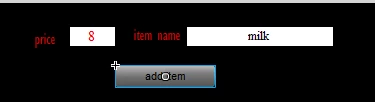
and when i do that(clicking add item), the item is going to the list object (in the second frame)
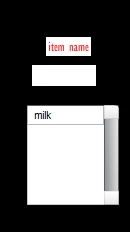
but the problem now , is when i try to make a miror for the list in text box it doesn,t work
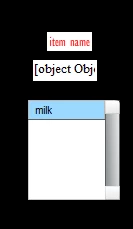
i.ve tried to make it string
helper = listbox1.selectedIndex
itemname11.text = String(listbox1.getItemAt(helper))
but still displaying it as object
...
here is the full code
package {
import flash.display.MovieClip;
import flash.events.MouseEvent
import flash.events.Event;
public class MAIN extends MovieClip {
var additemsvar:String
var addpricevar:int
var removeitemvar:int
var itemsnp:Array = new Array (100)
var itemsinfo:Object = new Object()
var za:int = 0
var da:Array = new Array (100)
var helper:int
var helper1:String
var helper2:String
public function MAIN () {
addbutton.addEventListener(MouseEvent.CLICK ,addbutton1)
removebutton.addEventListener(MouseEvent.CLICK ,removebutton1)
addEventListener(Event.ENTER_FRAME , onEnterFrame)
addEventListener(Event.ADDED_TO_STAGE,ADDED_TO_STAGE)
}
public function ADDED_TO_STAGE (event:Event){
itemsinfo.name1 = new Array()
itemsinfo.price1 = new Array()
}
public function onEnterFrame (event:Event){
helper = listbox1.selectedIndex
if(listbox1.selectedIndex != -1){
itemname11.text = String(listbox1.getItemAt(helper))
}
}
public function addbutton1 (event:MouseEvent){
additemsvar = additems.text
addpricevar = int (addprice.text)
listbox2.addItem ({label:itemsnp[za]})
itemsinfo.name1.push (additemsvar)
itemsinfo.price1.push (addpricevar)
listbox1.addItem ({label:(itemsinfo.name1[za])})
za += 1
for (var zb:String in itemsinfo){
trace (zb + ":" + itemsinfo[zb])
}
}
public function removebutton1 (event:MouseEvent){
trace (listbox1.selectedIndex)
listbox1.removeItemAt(listbox1.selectedIndex)
}
function traceItemsnpF(a:Array):void{
for(var i:int=0;i<a.length;i++){
for(var s:String in a){
trace(s,a+":"+a);
}
}
}
}
}
thank you


 AdChoices