francescot
Inspiring
January 27, 2021
Answered

Load MovieClip to specific frame on main timeline

  • January 27, 2021
  • 7 replies
  • 656 views

I currently have a movieclip which is loaded on the main timline on top of other buttons that call other movie clips.

I'm not sure what additional code I add to make the movie clip load on frame 2 of the main timeline, thus not interfering with the buttons below.


var that = this;
var myRectangle;

function addFromLibrary(e)
{
	if (!myRectangle)
	{
		myRectangle = new lib.Rectangle();
		that.addChild(myRectangle);
	}
}

function removeClip(e)
{
	if (myRectangle)
	{
		that.removeChild(myRectangle);
		myRectangle = null;
	}		
}

this.buttonAdd.addEventListener("click", addFromLibrary);
this.buttonRemove.addEventListener("click", removeClip);

 

    This topic has been closed for replies.
    Correct answer kglad

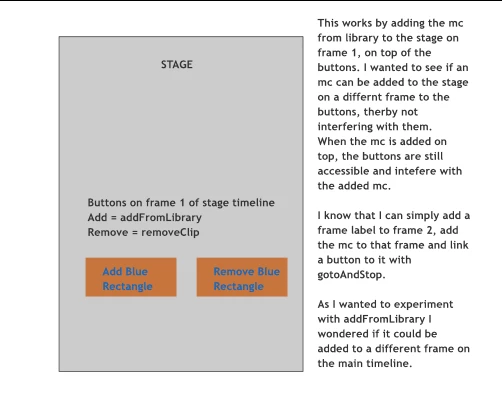
    Haha yes sorry my communication of what I'm experimenting with isn't too clear.

    I'll atempt to explain, with a diagram:


    background info:  you can always diable a button by:


    1. assign its visible property to false (eg, this.buttonAdd.visible = false; )

    2. remove its event listener (eg, this.buttonAdd.removeEventListener("click", addFromLibrary); )

    3. remove the button from the display (eg, this.buttonAdd.parent.removeChild(this.buttonAdd); )


    now, if you want to add something from your library to the stage (assign it a linkage name  - eg, mcID) at a certain frame,  add code at that frame:


    var mc = new lib.mcID();

    this.addChild(mc);


    if you want the code to be on one frame and add the symbol to a different frame, you can use that code in a button listener (if that's how you navigate to that other frame) or you can start a timer loop and check if the playhead's entered that frame and then add the symbol (and stop the loop).

    7 replies

    kglad
    Community Expert
    Community Expert
    January 27, 2021

    if you want a movieclip (or anything else) to appear on frame 2 of the main timeline, add an empty keyframe to frame 2 and add the desired object to that keyframe.


    if you want to use code to add a movieclip to frame 2, explain

    francescot
    Inspiring
    January 28, 2021

    Yes I'd like to add the movie clip to frame 2 using code.

    I've tried a couple of things none are working:

    Added the following

    var _this = this

    _this.stop();


    then as follows with a frame label which works.

    myRectangle = new lib.Rectangle();
    		that.addChild(myRectangle);
    that._goto('frameload');

     However, the button instance still appears active on the stage screen below the loaded mc.


    Thanks


     to

    kglad
    Community Expert
    Community Expert
    January 28, 2021

    your posts are confusing.


    in your first post you wrote, "I'm not sure what additional code I add to make the movie clip load on frame 2 of the main timeline, thus not interfering with the buttons below."


    in your second post you wrote, "However, the button instance still appears active on the stage screen below the loaded mc."


    and i can't tell if you're having trouble adding a movieclip on frame 2 and/or there's some button problem.