



stuarth24367417
Inspiring
April 15, 2020
Answered

Low quality Spritesheet when Publishing in Windows 10

  • April 15, 2020
  • 2 replies
  • 683 views

When I publish my HTML5 creative from Animate 2020 (v20.0.3) in Windows 10, the resulting Spritesheet PNG image is heavily compressed with a lot of dithering artifacts.


When I try v19.2.1, the PNG is clean and sharp as expected.


Here are the Image Settings under Publish Settings I'm using in v20.0.3:
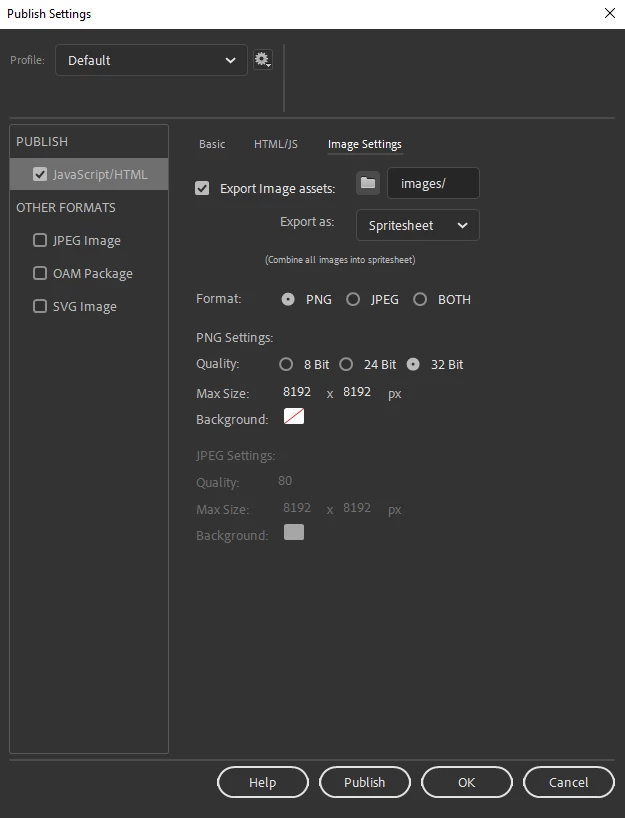
 

Try as I might, I can't clear up the dithering artifacts when publishing the document from my Windows 10 machine! Is this just bugged or what?


Is there a way to rectify this so that the Spritesheet PNG exports as intended?

    This topic has been closed for replies.
    Correct answer stuarth24367417

    Looks like I didn't look through the forum hard enough - someone is also reporting related issues and an Adobe employee has acknowledged there is an issue with the 32-bit image format. Here's a link to the thread and another one.

    2 replies

    Mohanaraj
    Adobe Employee
    Adobe Employee
    June 16, 2020

    Hi,

    Just want to let you know that the latest Animate update 20.5 (build 29329) released today has a fix for this issue. Request you to please update your copy of Animate to the latest using Creative Cloud desktop application to avail the fix.

    You can learn more about this update at https://helpx.adobe.com/animate/using/whats-new.html


    Thanks!

    Mohan

    stuarth24367417
    stuarth24367417AuthorCorrect answer
    Inspiring
    April 15, 2020

    Looks like I didn't look through the forum hard enough - someone is also reporting related issues and an Adobe employee has acknowledged there is an issue with the 32-bit image format. Here's a link to the thread and another one.