
Participant
January 22, 2015
Question

Making stretching banner on AS 2.0

  • January 22, 2015
  • 1 reply
  • 410 views

Dear friends, please help to solve the problem.
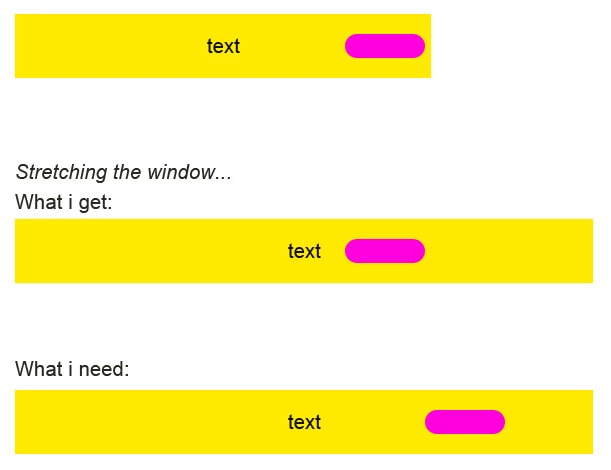
I have created a stretching banner based on action script 2.0 (100% x90px), on one of the layers added gif button (imported), which is located on the right side of the banner. It is essential that the button does not move when stretching a banner. I would be grateful for any help!


Stage.scaleMode = "noScale";

Stage.align = "LT";

var obResize:Object = new Object();

Stage.addListener(obResize);

obResize.onResize = function() {Resize()};

function Resize(){

    //stretching the background

    Fon_mc._width=Stage.width;

    //center the clip

    imggg2._x=Stage.width/2;

};

Resize();


This topic has been closed for replies.

1 reply

Ned Murphy
Legend
January 22, 2015

It apopears that if you were to make the button a part of imgg2 that it should stay where you put it relative to the text's registration mark.   Similarly, if you want to keep it separate, you should still be able to change its _x property in a similar fashion such that it is always the same distance from the center as you show wanting it to be.

Participant
January 23, 2015

I wanna keep this button separate. My button is a gif animation. Could you please help me with a code?

Ned Murphy
Legend
January 23, 2015

Something like the following might work... using your code and assuming "btnName" as the instance name of the button (name it however you wish)...

Stage.scaleMode = "noScale";

Stage.align = "LT";

var btnDistanceFromCenter:Number =  btnName._x - Stage.width/2; // establish the distance from center

var obResize:Object = new Object();

Stage.addListener(obResize);

obResize.onResize = function() {Resize()};

function Resize(){

    //stretching the background

    Fon_mc._width=Stage.width;

    //center the clip

    imggg2._x=Stage.width/2;

    btnName._x = Stage.width/2 + btnDistanceFromCenter; // move the button to be the same distance from the center

};

Resize();