

Masking one container with another?
I am creating a slider that I would like to change color relative to where the slider "button is at. 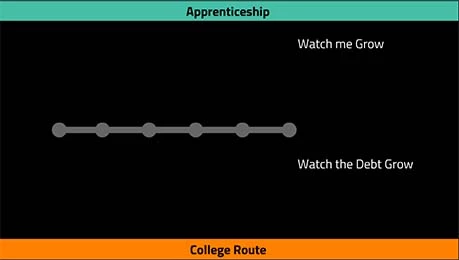
Here is the base of the slider "sliderBase" is the grey bar that will stay stationary and be slid across.
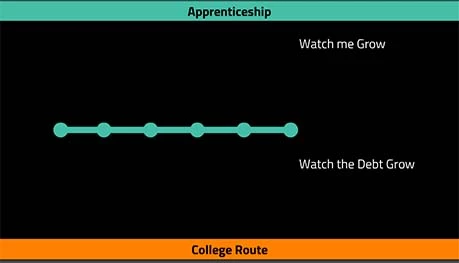
The green slider "sliderBaseGreen" is what I would like to be unmasked as the matte passes over it.
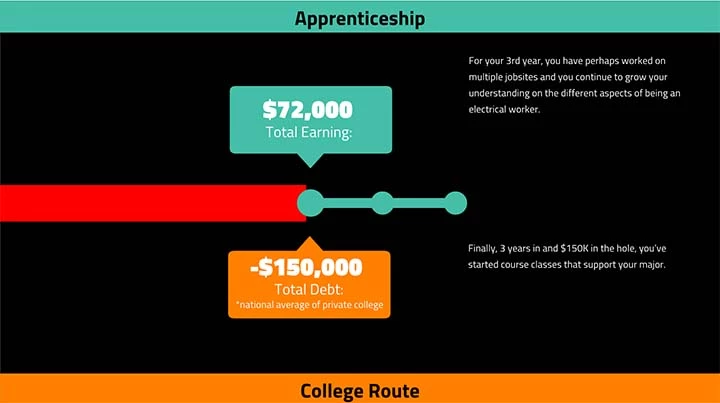
The red bar is the "sliderBaseMatte" which I would like to use to reveal the green slider bar.
my code so far is:
_stage = this;
slider = new lib.slider();
sliderBase = new lib.sliderBase();
sliderBaseGreen = new lib.sliderBaseGreen();
sliderBaseMatte = new lib.sliderBaseMatte();
SLIDER = new createjs.Container();
SLIDER.addChild(slider,);
SLIDER.x = 27.05;
SLIDER.y = 170.85;
SLIDERBASE = new createjs.Container();
SLIDERBASE.x = 168.95;
SLIDERBASE.y = 381.8;
SLIDERBASE.addChild(sliderBase);
SLIDERBASEGREEN = new createjs.Container();
SLIDERBASEGREEN.x = 168.95;
SLIDERBASEGREEN.y = 381.8;
sliderBaseMatte.x = -760;
sliderBaseMatte.y = -13;SLIDERBASEGREEN.addChild(sliderBaseGreen);
console.log(stage.getChildIndex(SLIDERBASEGREEN.sliderBaseMatte));
SLIDERBASEMATTE = new createjs.Container();
SLIDERBASEMATTE.x = 168.95;
SLIDERBASEMATTE.y = 381.8;
SLIDERBASEMATTE.addChild(sliderBaseMatte);
stage.addChild(SLIDERBASE, SLIDERBASEGREEN, SLIDERBASEMATTE, SLIDER)
//console.log(stage.getChildIndex(SLIDERBASEMATTE));
var isMouseDown = false, sliderValue;
var isClicked = false;
SLIDER.on("mousedown", function (evt) {
this.parent.addChild(this);
this.offset = {
x: this.x - evt.stageX
};
});
SLIDER.on("mouseout ", function (evt) {
stage.preventSelection = false;
});
SLIDER.on("pressmove", function (evt) {
this.x = evt.stageX + this.offset.x;
isMouseDown = true;
});
SLIDER.on("pressup", function (evt) {
isMouseDown = false;
});
createjs.Ticker.addEventListener("tick", handleTick);
function handleTick(event) {
if (SLIDER.x < 27.05) { // To prevent slider moving left side beyond the base
SLIDER.x = 27.05;
}
if (SLIDER.x > 749) { // To prevent slider moving right side beyond the base
SLIDER.x = 749;
}
if (isMouseDown == true) {
sliderValue = Math.ceil((SLIDER.x - 117) / 3);
SLIDERBASEMATTE.x = SLIDER.x + 140;
}
//console.log(sliderValue);
stage.update();
valueCheck();
}
function valueCheck(){
if(sliderValue === undefined || sliderValue <= 13){
_stage.apprenticeText.gotoAndStop(0);
_stage.debtText.gotoAndStop(0);
slider.earningsNumber.gotoAndStop(0);
slider.debtNumber.gotoAndStop(0);
//snapValue();
}
else if(sliderValue >= 14 && sliderValue <= 64 ){
_stage.apprenticeText.gotoAndStop(1);
_stage.debtText.gotoAndStop(1);
slider.earningsNumber.gotoAndStop(1);
slider.debtNumber.gotoAndStop(1);
//snapValue();
}
else if(sliderValue >= 65 && sliderValue <= 112 ){
_stage.apprenticeText.gotoAndStop(2);
_stage.debtText.gotoAndStop(2);
slider.earningsNumber.gotoAndStop(2);
slider.debtNumber.gotoAndStop(2);
//snapValue();
}
else if(sliderValue >= 113 && sliderValue <= 161){
_stage.apprenticeText.gotoAndStop(3);
_stage.debtText.gotoAndStop(3);
slider.earningsNumber.gotoAndStop(3);
slider.debtNumber.gotoAndStop(3);
//snapValue();
}
else if(sliderValue >= 162 && sliderValue <= 210){
TweenMax.to(_stage.apprenticeText, .5, {ease: Expo.easeOut, x:1185});
TweenMax.to(_stage.debtText, .5, {ease: Expo.easeOut, x:1037});
_stage.apprenticeText.gotoAndStop(4);
_stage.debtText.gotoAndStop(4);
slider.earningsNumber.gotoAndStop(4);
slider.debtNumber.gotoAndStop(4);
//snapValue();
stage.update();
}
else{
TweenMax.to(_stage.apprenticeText, .5, {ease: Expo.easeOut, x:400});
TweenMax.to(_stage.debtText, .5, {ease: Expo.easeOut, x:260});
_stage.apprenticeText.gotoAndStop(5);
_stage.debtText.gotoAndStop(5);
slider.earningsNumber.gotoAndStop(5);
slider.debtNumber.gotoAndStop(5);
//snapValue();
stage.update();
}
}
Alot of stuff going on in there, but basically i'm curious if I can have sliderBaseGreen in a container, and mask it with the sliderBaseMatte contrainer? Or if anyone has any ideas, I would love to hear em.
Thanks


 AdChoices