
Merging with a shadow/highlight layer?
Ok, so im totally new to Flash, in fact, im a 3DS Max/Maya animator, so this is all pretty new.
I am fairly fluent in Photoshop, and im trying to figure out a small problem I am having.
I will try to be as clear as possible, so bear with me...
I have created a character (superman) in Flash (action script3) who is divided in many layers.
His eyebrows, mouth, wrinkles, eyes ect are all on seperate layers. I figured that was something you needed to do to allow ease in animation? Keep the head as one solid object, but keep the eyes, eyeborws ect on a different layer to animate... (right?)
After building the face color layer, I added a shadow and highlights layer on top of it. After doing so, I have tried to `merge` them (which i believe is when you make it a `symbol'?) and it gives me a strange result. Either the shaded areas turn black, or the cut out the color of the face, almost like they have become a mask.
Here is a before and after:
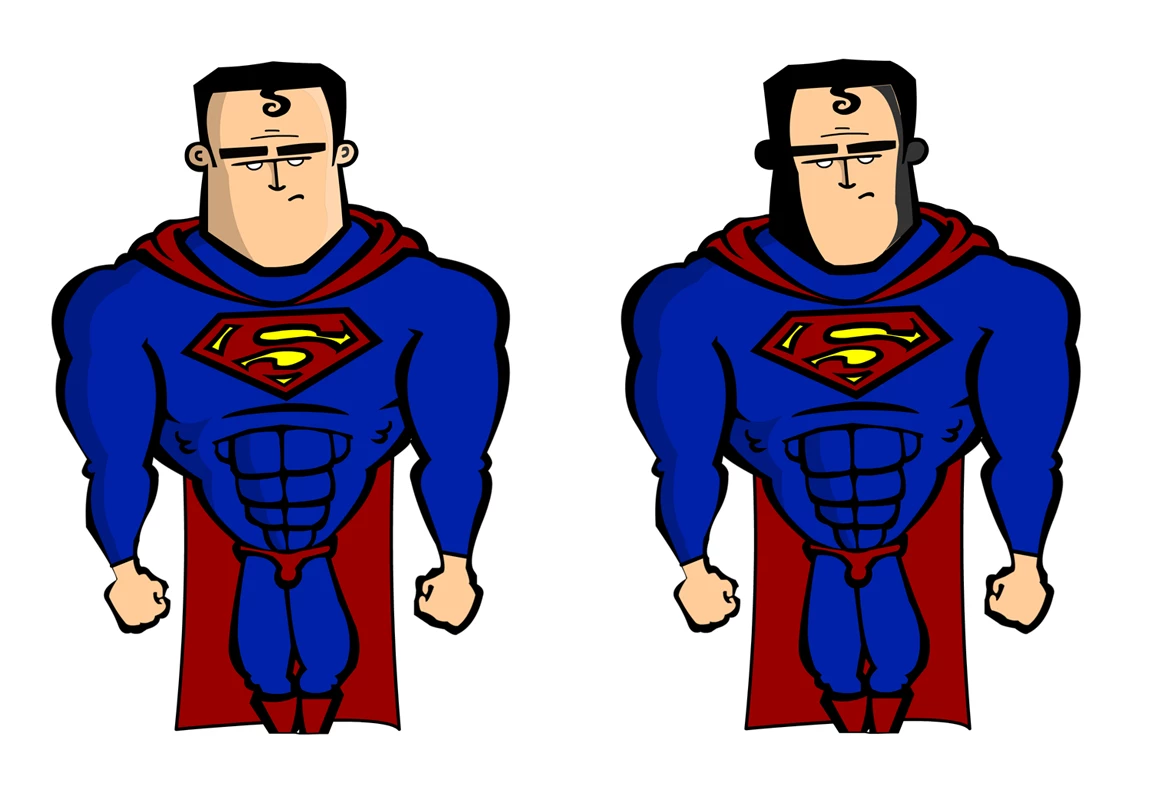
So im curious, is there any way I can merge my highlights and shadows layer to the base layer, without this problem? Or is there something I am missing. The shadows and highlights were made just by layering a black, or white, layer with opacity, over top of the solid color layer. I figured it would be as easy as it would be in Photoshop, just merge them in the end, but no. Then again, this is new software all together for me, so I could be missing something.
As you can see, its made up of many layers:

So the other question is:
After I manage to merge the proper layers with each other (Face, face outline (stroke), highlights and shadows to make up the HEAD) how do I cut the rest of it up for animation?
Seeing as his body is one piece, from neck to feet (including arms), how am I going to cut that up and still maintain the vector lines? Or will I need to build the arms totally separate, and then layer it that way...
Sorry if I sound like a total noob, but I am...
Thanks in advance 
 AdChoices