


Participant
January 25, 2021
Question

Missing Fonts

  • January 25, 2021
  • 2 replies
  • 332 views

Hi I am doing a tutorial and when I go to load it up to Animate CC 2021 it says: "The document "'123.fla''' contains 1 or more fonts currently not on your system. The text will display and publish witht The font mapping below: 
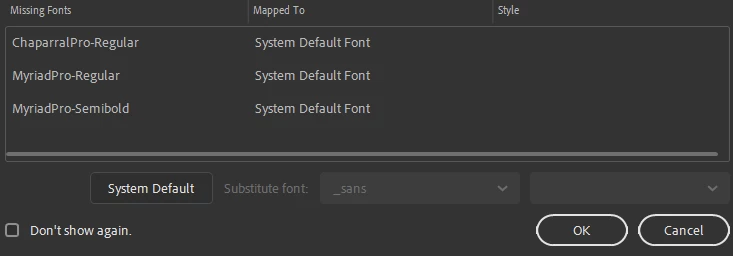
How do I add fonts and figure this out? 

Any tips would help or if you could help me, Thanks!

    This topic has been closed for replies.

    2 replies

    Warren Heaton
    Community Expert
    Community Expert
    January 25, 2021

    They're both availabe from Adobe Fonts and they're included with your Creative Cloud subscription if you have the All Apps version.  If you're subscribing to Animate by itself, I think they're available for purchase instead.

    Chaparral | Adobe Fonts


    Myriad | Adobe Fonts

    kglad
    Community Expert
    Community Expert
    January 25, 2021

    you can probably ignore that warning.  if the tutorial needed those fonts, the author should have made then available.


    because it's unlikely the tutorial needs those fonts, just pick any 1-3 fonts you have on your system. 


    p.s. you can probably download and install those fonts for free.  google it.  (it's sure not worth paying for any fonts for this purpose.)