
Participant
June 19, 2019
Question

Motion tween on multiple objects?

  • June 19, 2019
  • 4 replies
  • 3436 views

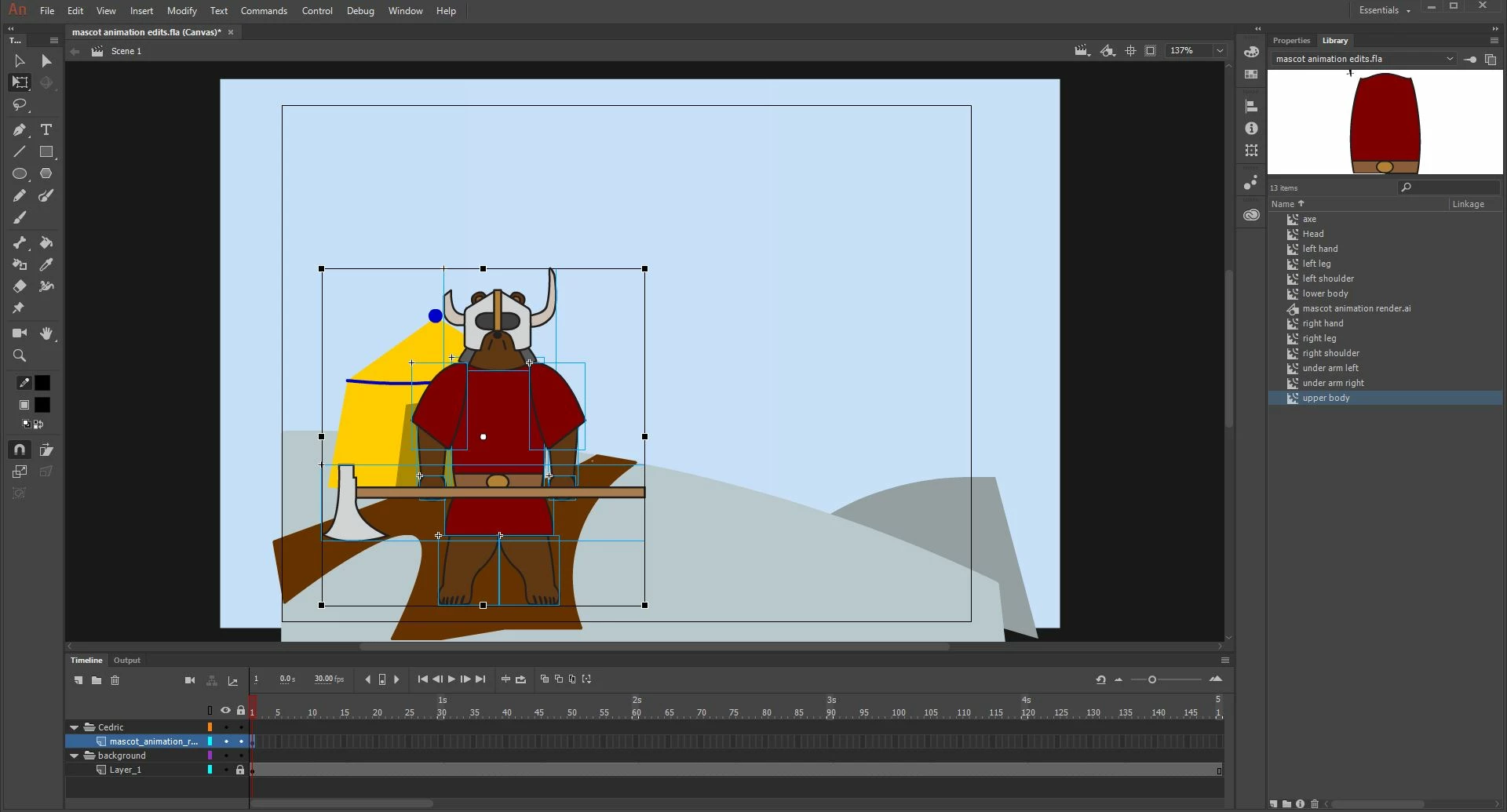
Hi, I'm stuck on creating an animation. What I want to do, is to give the bear fluid movements, but if I use motion tween then I have to convert all the body parts to a single symbol which wont let me edit them. I tried using the bone tool, but If I try to resize it, the it gets distorted. Does anyone have advice?
This topic has been closed for replies.

4 replies

_keyframer
Community Expert
Community Expert
June 24, 2019
Animator and content creator for Animate CC
_keyframer
Community Expert
Community Expert
June 24, 2019

Also worth noting that when you launch Animate CC you will see the Start Screen and along the bottom are example files you can open and study how they were built. Many of these involve animated characters I created myself so if you have further questions please don't hesitate to ask.

Animator and content creator for Animate CC
_keyframer
Community Expert
Community Expert
June 24, 2019

Fluid movement. Okay. Let's assume you are referring to the movement of each limb and body part and not just the entire bear as it is in this pose moving across the screen.

This comes down to rigging the character. I have found it best to separate all limbs and body parts into symbols. Yes they can still be edited after being converted (if they are vector drawings as opposed to imported bitmaps). Convert the entire character with all limbs as a single Graphic symbol. Double-click this symbol and select all body parts. Right click over the selection of all symbols and Distribute to Layers...

With each symbol on its own layer, select the Free Transform tool (Q), select each individual symbol and move the center point (small white dot) to where the body part should hinge anatomically.

Next, create additional keyframes in this nested timeline and pose your character. Apply Classic tweens.

There's a lot more to explain but want to at least get you started.

Animator and content creator for Animate CC
n. tilcheff
Legend
June 19, 2019

Hi mate,

Please, look here: Character rigging for Flash animation | electric dog :: flanimate power tools

and here: http://flash-powertools.com/workflow/

and also here: Understanding symbol registration in Flash and Animate | electric dog :: flanimate power tools

Briefly:

Is there a reason that your file is HTML5 Canvas? If not, convert it to AS3 to get the full Animate experience.

All your symbols for character animation have to be Graphic and not Movieclip. You have to change type both in Library and on Stage.

They have to be properly registered, not top-left.

Right-click and 'distribute to layers'. Then, when you have one symbol per layer, you can apply Classic Tweens.

If you wanт to have control over the whole as well, you should nest all your character elements in a container, move the container as a whole while animating inside it the individual elements.

No one uses Motion Tweens for a good reason.

No one uses Bones for a good reason.

On top of everything else, it is not a good idea to have your layers on the Main Timeline. Keep everything nested inside a container and work at least one level deep.

This template might help you better understand file structure for character animation: EDAPT Movie Template v.2 (free download) | electric dog :: flanimate power tools

Hope this helps!

NT

Nick - Character Designer and Animator, Flash user since 1998 | Member of the Flanimate Power Tools team - extensions for character animation