


Participant
December 16, 2020
Question

Mouseover Layers Issue

  • December 16, 2020
  • 1 reply
  • 628 views

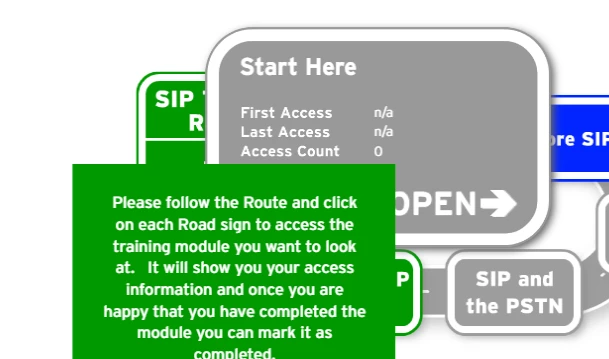
Hi all, I am having a problem in Animate where mouseover layers are being triggered even if there is something over the top. In the below picture the green overlay should not be triggered unless I mouseover the green button below it, and it shouldn't be triggered when the mouse is over the grey popup at all. It seems that even thought the grey popup is above the green one it still triggers the mouseover when the mouse goes into the area where it would be below it (hope that makes sense!). Is there a way to fix this? Each item is on it's own layer in the timeline.
    This topic has been closed for replies.

    1 reply

    Legend
    December 16, 2020

    The only way to block a button is with another button.

    Participant
    December 16, 2020

    So I would need to turn the grey box into a button? That seems pretty weird that it can "see through" layers

    Legend
    December 16, 2020

    There is no such thing as "seeing through" a layer. Layers are just an abstract organizational concept. There is no such thing as a "mouseover layer" in Animate. I don't know where you got that expression from. There are buttons, and sometimes movieclips that have been made to act like buttons. Mouse events do not care about layers. Mouse events do not care about anything except symbols that are listening for mouse events. The only thing the mouse event dispatcher looks for is the boundaries of all the current buttons, and which one is highest if any of them overlap. Whichever button the mouse is within, gets the mouse events.