
Known Participant
August 17, 2018
Answered

move frames in a motion tween

  • August 17, 2018
  • 2 replies
  • 1174 views

hello all,

i'm getting very very frustrated with Animate. i was using flash years ago and i dont remember this being soooooooooooo frustrating!!!


all i wanna do is move a single frame to extend a motion tween BUT!!! BUT!!!

every time i try, using multiple key combinations, it constantly adds blank keyframes GRRRRR then a motion tween frames
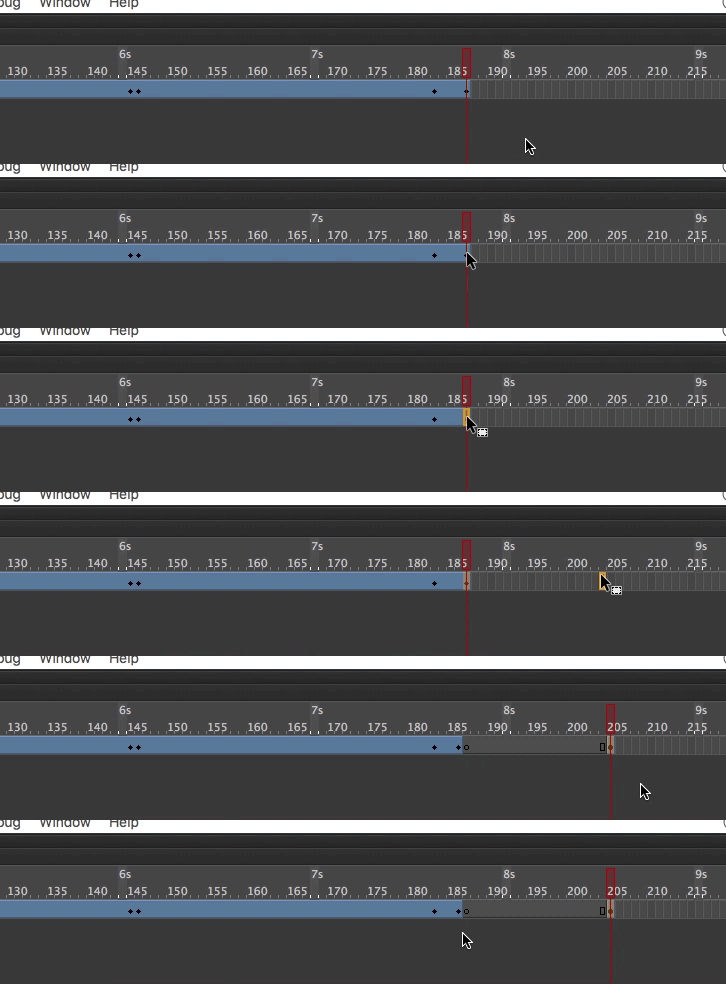
why does it do this!?

thanks in advanced

This topic has been closed for replies.
Correct answer chenjil43641795

Your operation is a traditional tweened operation.

And you built the Adobe Tween.Action, Action, first insert the normal frame, and then drag the keyframe.

There are many forms of tween at present, but the operation is not unified.

You can think of the new tween as a container.It is OK to move frames inside the container, if you exceed the container, you need to extend the length of the container.The same is true of skeletal conditions.

I also think that there is no traditional complementary use of convenience, more trouble to operate

2 replies

Community Expert
August 19, 2018

This is a goof tutorial on motion tween. Animate CC - Create Motion Tween Animations - YouTube

kglad
Community Expert
Community Expert
August 17, 2018

when you see that double-headed arrow, drag to the right.

Gandhi4Author
Known Participant
August 17, 2018

if i do that it stretches the entire motion tween/moves all of the all the keyframes.

i just want to move 1 frame, to extend the end of the tween, not all of the tween.

if you look at the image/gif you'll see what i want.....

why can i not move 1 frame and rather than filling it with blank frames it fills it with the blue motion tween frames...... its so annoying?

kglad
Community Expert
Community Expert
August 17, 2018

if that's not what you want, right click the timeline where you want to extend the tween and click insert frame.