Known Participant
April 18, 2011
Answered

moving an object vertically using a horizontal slider

  • April 18, 2011
  • 1 reply
  • 1545 views

So, I've been struggling with this for hours.  I have a button, a slider (yellow triangle) that moves horizontally within a range.  Above the slider is a vertical meter that should move up/down based on the horizontal movement of the slider, i.e. if the slider moves to the left, the meter should rise; if the slider moves right, the meter should fall.  Both objects start at the center of their axis as shown in the image provided.
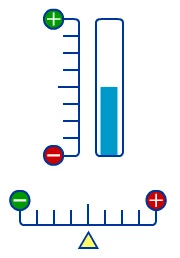
Here's what I have so far to display the masked meter correctly and to limit the slider to the range of the horizontal axis.  I can't figure out the rest to make the meter move accordingly.  Someone out there for whom this is really easy, please help me through this; talk me through your logic of how to make this work.  Thank you!

//BY THE WAY, THIS IS ACTIONSCRIPT 2

import flash.geom.Rectangle;

stop();

var varMaskRect:Rectangle;
var varMeterContainer:MovieClip;
var varMeterBar:MovieClip;
var varMeterMove:String;

createScrollRect = function():Void
{
    var nWidth:Number = mc_MeterContainer.mc_MeterBar._width;
    var nHeight:Number = mc_MeterContainer._height;
       
    varMaskRect = new Rectangle(0, 0, nWidth, nHeight);
    mc_MeterContainer.scrollRect = varMaskRect;
   
    varMeterBar = mc_MeterContainer.mc_MeterBar;
}

createScrollRect();

var varScrollLeftLim:Number = 18.0;
var varScrollRightLim:Number = 153.9;
var varScrollTopLim:Number = 213.25;
var varScrollBottomLim:Number = 213.25;

//I need help here...

scrollContent = function():Void
{
    //I need help here...
}

mc_Slider.onPress = function():Void
{
    startDrag(mc_Slider, false, varScrollLeftLim, varScrollTopLim, varScrollRightLim, varScrollBottomLim);
    mc_Slider.onMouseMove = scrollContent;
}

mc_Slider.onRelease = mc_Slider.onReleaseOutside = function():Void
{
    mc_Slider.stopDrag();
    mc_Slider.onMouseMove = null;
}

This topic has been closed for replies.
Correct answer kglad

let me try an make this easier for you:

1.  assign your blue rect an instance name, eg blue_mc.

2.  make sure its reg point is at its bottom

3.  make sure your unscaled rectangle extends to the top of the meter.  ie, on-stage it's at the max.

4.  copy and paste the following in place of the code you showed

///////////// change nothing below ////////////////////////

paramF(blue_mc,varScrollLeftLim,0,varScrollRightLim,1);
scrollContent();

scrollContent = function():Void{
   blue_mc.scaleY=blue_mc.m*mc_Slider._x+blue_mc.b;
}

mc_Slider.onPress = function():Void{
    startDrag(mc_Slider, false, varScrollLeftLim, varScrollTopLim, varScrollRightLim, varScrollBottomLim);
    mc_Slider.onMouseMove = scrollContent;
}

mc_Slider.onRelease = mc_Slider.onReleaseOutside = function():Void{
    mc_Slider.stopDrag();
    mc_Slider.onMouseMove = null;
}


function paramF(mc:MovieClip,x1:Number,y1:Number,x2:Number,y2:Number):void{
mc.m=(y1-y2)/(x1-x2);
mc.b=y1-mc.m*x1;
}


oops, i mixed as3 in there:


1.  assign your blue rect an instance name, eg blue_mc.

2.  make sure its reg point is at its bottom

3.  make sure your unscaled rectangle extends to the top of the meter.  ie, on-stage it's at the max.

4.  copy and paste the following in place of the code you showed

///////////// change nothing below ////////////////////////

paramF(blue_mc,varScrollLeftLim,0,varScrollRightLim,100);
scrollContent();

scrollContent = function():Void{
   blue_mc._yscale=blue_mc.m*mc_Slider._x+blue_mc.b;
}

mc_Slider.onPress = function():Void{
    startDrag(mc_Slider, false, varScrollLeftLim, varScrollTopLim, varScrollRightLim, varScrollBottomLim);
    mc_Slider.onMouseMove = scrollContent;
}

mc_Slider.onRelease = mc_Slider.onReleaseOutside = function():Void{
    mc_Slider.stopDrag();
    mc_Slider.onMouseMove = null;
}


function paramF(mc:MovieClip,x1:Number,y1:Number,x2:Number,y2:Number):void{
mc.m=(y1-y2)/(x1-x2);
mc.b=y1-mc.m*x1;
}

1 reply

kglad
Community Expert
Community Expert
April 18, 2011

your blue rectangle should have it's reg point at its bottom,  you can vary its height from 0 to some max using your slider.

you can use the following to find the relevant parameters:

paramF(yourbluerect,varScrollLeftLim,0,varScrollRightLim:Number,somemax);

function paramF(mc:MovieClip,x1:Number,y1:Number,x2:Number,y2:Number):void{

mc.m=(y1-y2)/(x1-x2);

mc.b=y1-mc.m*x1;

}

Known Participant
April 20, 2011

Kglad, thanks for your response, however, I don't understand the code you provided.  I don't know what it means or where to insert it within my code that I provided. See my comments below

paramF(yourbluerect,varScrollLeftLim,0,varScrollRightLim:Number,somema x);

//When you say "yourbluerect," should I replace mc:MovieClip below with my movieclip instance name?

//What does "somema x" mean; what is this parameter referring to?

//The initial position of the blue rectangle (the meter) and the slider must be as seen in the graphic, i.e. starting in the middle of their respective axis.

// I see you've defined a function, but I don't know what it does. Can you talk me through it?

//Where in my code would I insert this function and where would I call it? terminate it?

function paramF(mc:MovieClip,x1:Number,y1:Number,x2:Number,y2:Number):void{

mc.m=(y1-y2)/(x1-x2);

mc.b=y1-mc.m*x1;

}

Thank you.

kglad
Community Expert
Community Expert
April 20, 2011

let me try an make this easier for you:

1.  assign your blue rect an instance name, eg blue_mc.

2.  make sure its reg point is at its bottom

3.  make sure your unscaled rectangle extends to the top of the meter.  ie, on-stage it's at the max.

4.  copy and paste the following in place of the code you showed

///////////// change nothing below ////////////////////////

paramF(blue_mc,varScrollLeftLim,0,varScrollRightLim,1);
scrollContent();

scrollContent = function():Void{
   blue_mc.scaleY=blue_mc.m*mc_Slider._x+blue_mc.b;
}

mc_Slider.onPress = function():Void{
    startDrag(mc_Slider, false, varScrollLeftLim, varScrollTopLim, varScrollRightLim, varScrollBottomLim);
    mc_Slider.onMouseMove = scrollContent;
}

mc_Slider.onRelease = mc_Slider.onReleaseOutside = function():Void{
    mc_Slider.stopDrag();
    mc_Slider.onMouseMove = null;
}


function paramF(mc:MovieClip,x1:Number,y1:Number,x2:Number,y2:Number):void{
mc.m=(y1-y2)/(x1-x2);
mc.b=y1-mc.m*x1;
}