
MP4 output is low-res
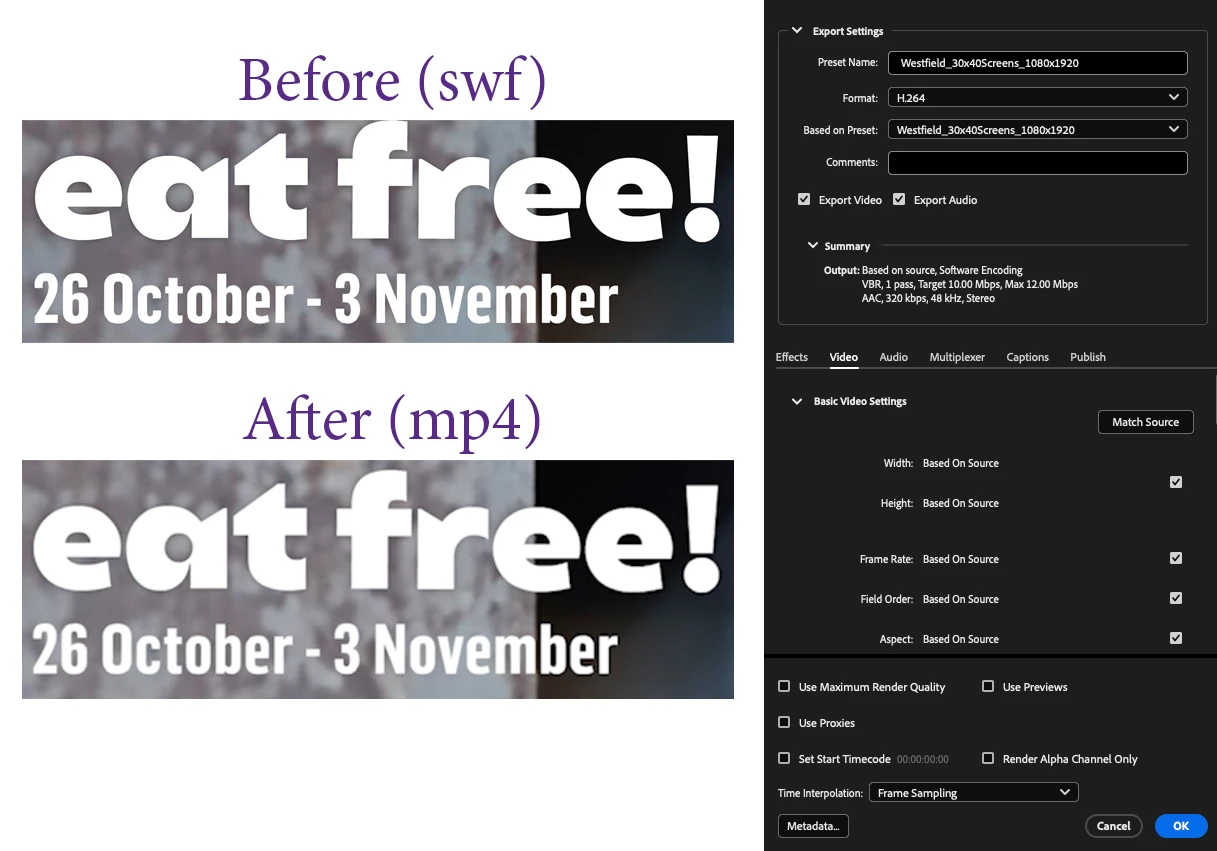
I have a project that I have created in Animate and it's not outputting properly and I can't fathom out why (I'm no professional on this matter so bear with it). The project is set up at a 1080px x 1920px project in Animate. The text is vectored. I am Exporting Video/Media from Animate in H.264 as a High-quality 1080p HD preset. It is set to automatically convert to MP4 in Media Encoder using the presets shown on the right-hand side of the accompanying image. [edit: for some reason, even though I checked "use maximum render quality", it's not showing on the image - the MP4 WAS created using it]. On the left at the top is a screen grab of part of the image once saved out as a .swf file. Underneath is the same file, grabbed after having been converted in Media Encoder. The difference is night and day! The MP4 is blurred and in other places within the movie, logos and type are really bad, even though they were originally vectors. It's nowhere near HD. Years ago, I used Movavi and looking at the files I presented then - still using Animate in the same way - the results are on par with the original .swf files. OK, Community - what am I doing wrong? Thank you.


 AdChoices