
potatopen
Participating Frequently
July 20, 2018
Answered

My Animate Problems

  • July 20, 2018
  • 2 replies
  • 1637 views

Hey!

     So I've been having problems with my adobe animate cc. I have 2 problems.

1. All my art is squiggly and has wiggles and stuff.

2. So, some people have problems because they have the 4k resolution so their icons are too small. Well, my problem is the opposite, even though my resolution is 1080p.

I will pin a screenshot.
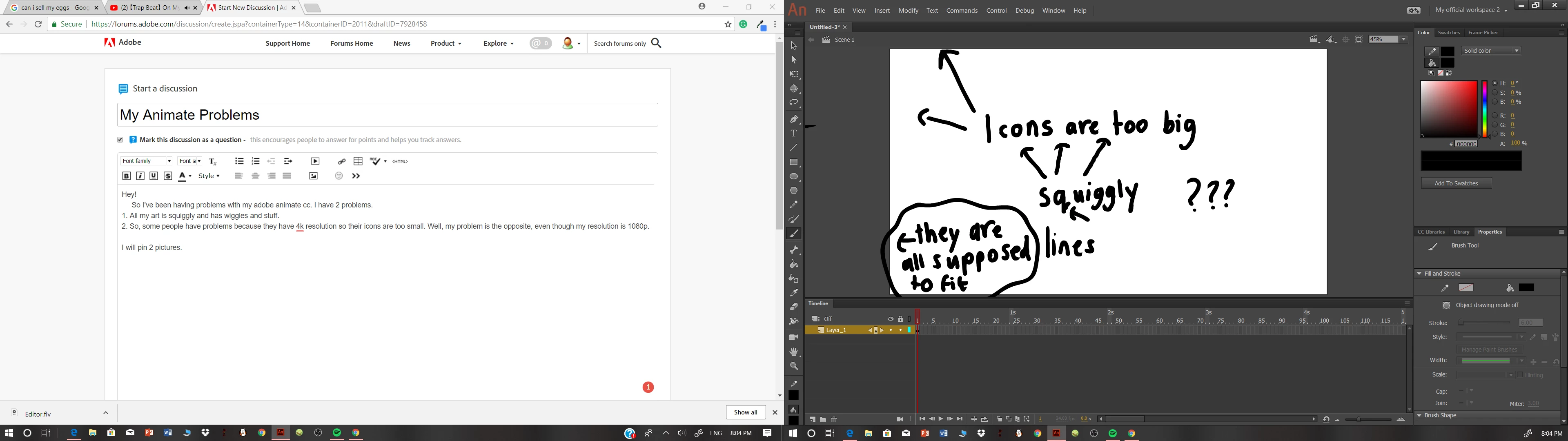
It isn't a problem with my drawing tablet. I've tried drawing on my drawing programs such as paint tool SAI and Firealpaca. I've tried to draw with no stabilizer and it worked fine. If it matters about the drawing tablet I use, it is the Huion Kamvas GT156HD V2. I hope that you will be able to find a solution to this. My biggest concern is the squiggly lines. It affects my use of the program. I hope that you understand this and thank you for your co-operation.\

Sincerely,

An Animate CC User

    This topic has been closed for replies.
    Correct answer ankushr40215001

    There actually is a difference. The lines for some reason feel smoother and the bumps have been removed.

    I hope this leads to a solution. Thanks, Ankush.

    But when I come to draw diagonal lines, it does add some bumps.


    Actually why I asked you to disconnect the Huion tablet is I got some more issues with it  - Huion Stylus not working with Animate CC

    Connect the tablet without enabling the graphic driver, and check its performance and then re-enable it.

    Now tell us if you see any difference, I am just trying to isolate the issue to either driver or tablet.

    Thanks!

    Ankush

    2 replies

    potatopen
    potatopenAuthor
    Participating Frequently
    July 20, 2018

    So whenever I draw using the brush tool (Not the paintbrush tool) When the smoothing takes action it smooths out the line and adds some bumps and wiggles onto the stroke. If you zoom in, you will understand. Also, when I said the icons are too big, I meant this. Whenever I would watch tutorials of Adobe animate, take for example draw with Jazza, all of his tools would appear on the toolbar in one line. While I have to stretch mine out to 2 lines in order for everything to fit. The 'An' sign on the top left corner of the screenshot. Compared to other users interfaces, it's too big. But my biggest concern is the bumps on the lines. Thanks for the support and I hope you will find a solution. 

    ankushr40215001
    Inspiring
    July 20, 2018

    Can you please test one thing for me?

    Please detach you Tablet, and disable the graphic driver if installed any.

    Now, simply set your brush smoothing to 60 and draw simply with the help of a mouse or track pad and see if you feel any difference.

    Thanks,

    Ankush

    potatopen
    potatopenAuthor
    Participating Frequently
    July 20, 2018

    There actually is a difference. The lines for some reason feel smoother and the bumps have been removed.

    I hope this leads to a solution. Thanks, Ankush.

    But when I come to draw diagonal lines, it does add some bumps.

    ankushr40215001
    Inspiring
    July 20, 2018

    Hey PotatoPen,

    I still am not able to understand your issue, are you facing any issue with Drawing tools like Pen, pencil or brush in Animate CC?

    In the above screen shot you have mentioned that the icons are too big! Which Icons are you referring to?

    Thanks,

    Ankush