ApvanR
Known Participant
February 20, 2019
Answered

My HTML5-animation doesn't show on iPad

  • February 20, 2019
  • 3 replies
  • 1543 views

Good day,

I've produced an interactive infographic, made on a HTML5 canvas in Adobe Animate on my Mac (Mac Pro, 10.11.6, 2,93 QuadCore, 20 GB).

The thing works perfectly on all desktops and with all browsers, but on the iPad it just isn't responsive: it doesn't come into view, only after a long wait (minutes) and/or fiddling with the apps (closing Safaria, re-opening and some swiping) the infographic appears on screen.

Are there any known issues playing here?

If interested, you can see the infographic here: testen.datverandertalles.nl.

Thanks in advance!

Ap
This topic has been closed for replies.
Correct answer kglad

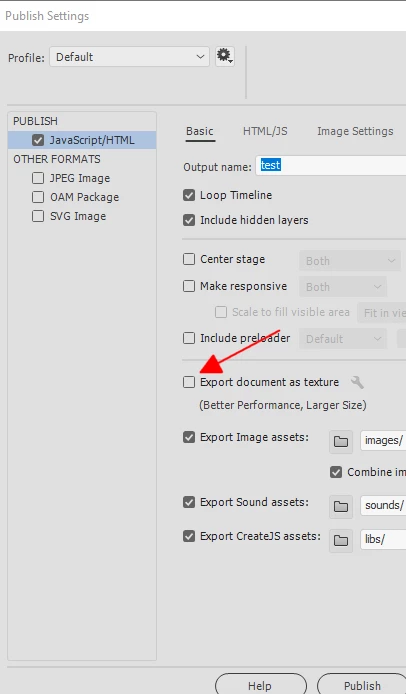
toggle your document as texture and retest.

3 replies

kglad
Community Expert
kgladCommunity ExpertCorrect answer
Community Expert
February 21, 2019

toggle your document as texture and retest.

ApvanR
ApvanRAuthor
Known Participant
February 21, 2019

Hey, this seems to be working nice! Will have to test a few more environments (incl. iPad, not one with me now), but till now it looks good. The list on the server has become quite crowded with a lot of png's as a result of exporting as texture, but that's a small price to pay.

I had just finished removing the TypeKit-fonts from the file and replacing them with Google fonts, because TK appeared to cause the most errors. I'm still curious whether this would have had any effect.

Thanks for now!

Ap

kdmemory
Inspiring
February 21, 2019

Congratulations Ap

Now i can see it with FxDE. Great stuff. And the TypeError is gone.

I wonder if kglad meant with "toggle your document as texture and retest" to uncheck or check that option. He didn't set a tick there in his screenshot. However you ticked the option. I guess it works both ways and it had more to do with Typekit fonts.

Glad it works now

Klaus

kdmemory
Inspiring
February 20, 2019

Hi Kiegle

I tested PON Koersplan 2019-2022 on Firefox Developer Edition [66.0b9 (64-bit)] On MacOS 10.14.3 and can only see white.

There are two Errors coming up in the Console:

number 1

Typekit: the domain "testen.datverandertalles.nl" isn't in the list of published domains for kit "1734947_a7c4fd836d52f0f41695152c31b1be8f".

It seems that you have to add the domain testen.datverandertalles.nl (probably starting with http://) in the Publish Settings under Web fonts. There's a field where it says "Please enter the domain URL where your content will be published on the Web."

A short while later appear error number 2

TypeError: f is undefined[Learn More] createjs-2015.11.26.min.js:12:17890

I have no idea about this but I guess it might be a consequence of error number 1.

The same happens in Google Chrome, particularly the Typekit issue.

Enter the URL and try again.

Klaus

ApvanR
ApvanRAuthor
Known Participant
February 20, 2019

Hi Klaus,

Thanks for your input. Indeed, the url for TypeKit wasn't specified this time, for I didn't believe it would be a font issue. However, I re-published and included the test-url for TypeKit now. So it's up again at testen.datverandertalles.nl.

Inspired by your (and Kglad's) response I installed my own Firefox Developer Edition, and found no trace of the first (TypeKIt) or second error you mentioned ('f is undefined').

Meanwhile, the infographic still doesn't show up on my iPad.

I have a feeling it must be something else than a font issue.

Thanks,

Kiegie

kdmemory
Inspiring
February 20, 2019

Hi Kiegle

I still see only white in FxDE.

Typekit error is gone, but TypeError: f is undefined is still there.

When you see the entire console message

TypeError: f is undefined - createjs-2015.11.26.min.js:12:17890

Just funwise I looked there in line12, char 17890, there is indeed something that goes:

f.getContext --- before the f is precisely the char-position 17890 ??!!

I'm not sure but what is strange too is your <html) opening tag, which goes

<html class="wf-tkopensans-n3-active wf-tkopensans-n6-active wf-active">

There are 3 classes, all prefixed with wf- and obviously dutch sounding (tkopensans - Err, what is that??)

Regular HTML documents coming out of Animate don't have this. It might be alright, though in your place I would look into this.

Klaus

kglad
Community Expert
Community Expert
February 20, 2019

you have errors including a typekit issue.

open your site in a browser and enable developer mode to debug.