Participant
June 25, 2017
Answered

My png object disappeared and I can only see the outline of a box

  • June 25, 2017
  • 1 reply
  • 391 views

I imported this png drawing into Animate and I was able to keyframe it.

When I went to playback the animation, I noticed the png has disappeared.

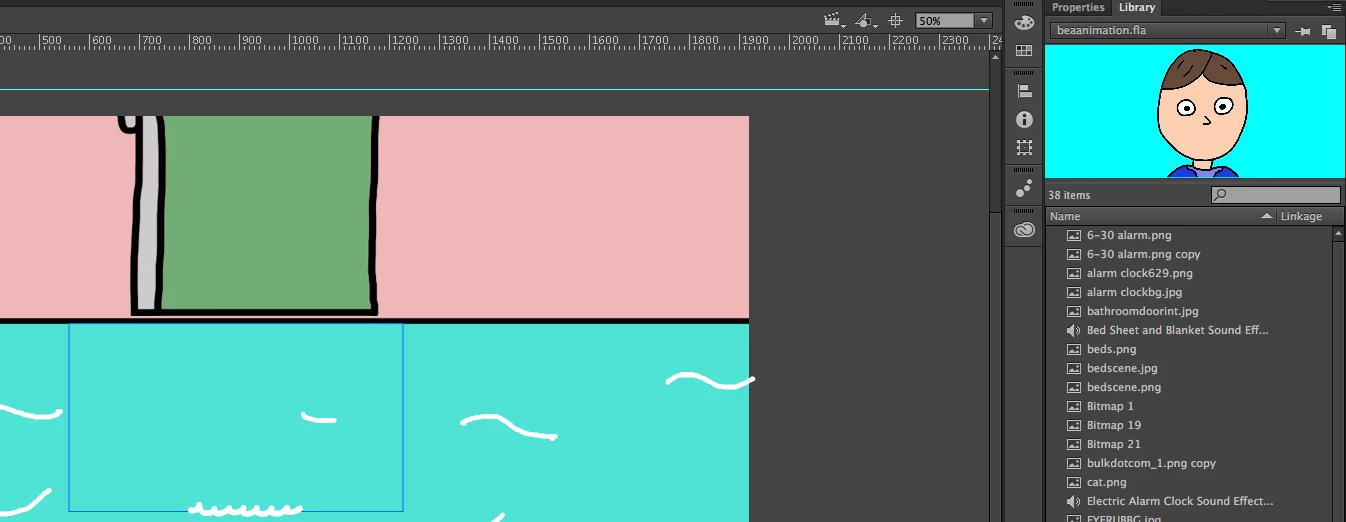
When I click on one of the keyframes of the png, all I see on the stage is this blue box.

Adobe Animate shows the png object in the library but it won't show on the stage.
This topic has been closed for replies.
Correct answer Colin Holgate

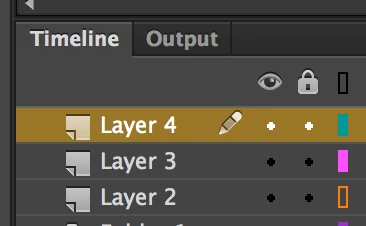
In each layer in the timeline there is a little colored rectangle, just to the right of the padlock column. If you have clicked on that it would make just the outline of the PNG show up. Try clicking to make the rectangle be filled in, instead of just an outline.

1 reply

Colin Holgate
Colin HolgateCorrect answer
Inspiring
June 25, 2017

In each layer in the timeline there is a little colored rectangle, just to the right of the padlock column. If you have clicked on that it would make just the outline of the PNG show up. Try clicking to make the rectangle be filled in, instead of just an outline.