
Participant
October 6, 2022
Answered

My video doesn't play when imported into Adobe Animate

  • October 6, 2022
  • 1 reply
  • 207 views

I've tried importing with playback with an mp4 and I've tried embedding flv as well. While the boxes appear they don't play as I scrub the timeline. I have tried importing them into the library as well. As I want the video to be exported out with the animation at the end I'm not trying the last option under import-video. Advice would be greatly appreciated

--I know it's not the videos as I have been able to successfully import those same videos before in an earlier file
This topic has been closed for replies.
Correct answer kglad

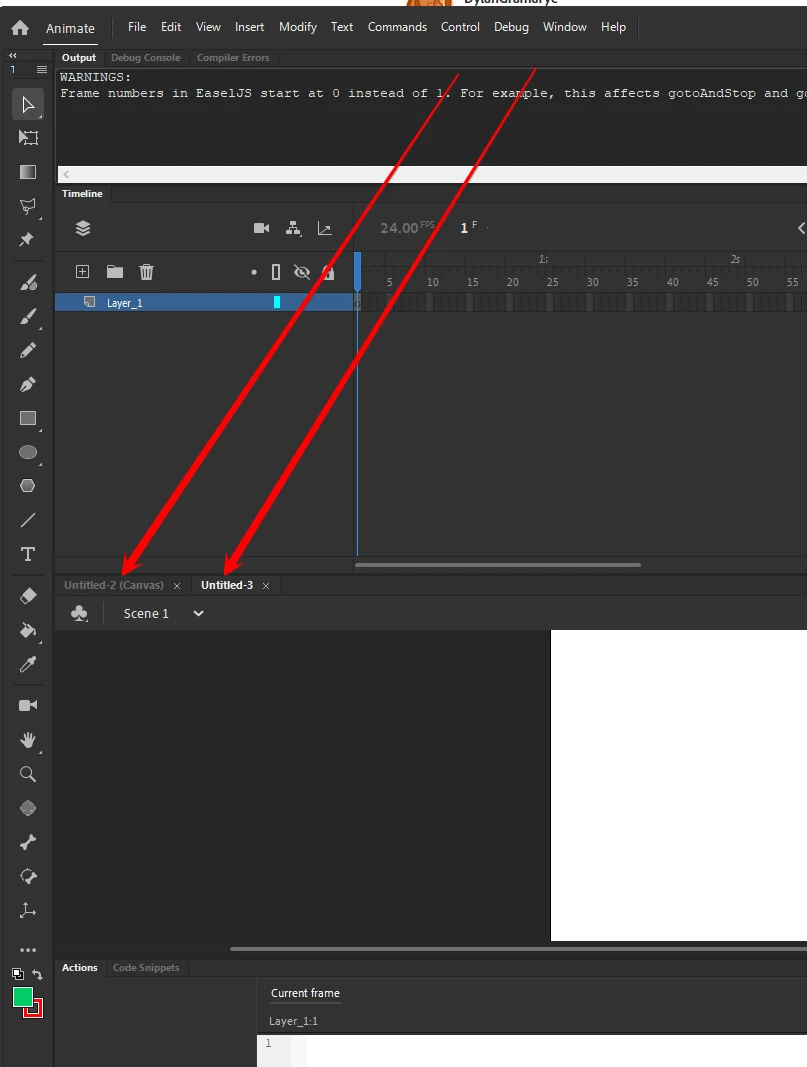
when you start to create an animate project, you have several options.  the only two that would make sense (given the info in your first post) is as3 or html5/canvas.


if you open your project, the file name shown in animate will either be something (canvsa), or just something.


which is yours?


1 reply

kglad
Community Expert
Community Expert
October 6, 2022

as3 or html5/canvas project?

Participant
October 6, 2022
Unsure what either of those are
kglad
Community Expert
kgladCommunity ExpertCorrect answer
Community Expert
October 6, 2022

when you start to create an animate project, you have several options.  the only two that would make sense (given the info in your first post) is as3 or html5/canvas.


if you open your project, the file name shown in animate will either be something (canvsa), or just something.


which is yours?