

avtutorials
Known Participant
February 10, 2022
Question

Need Help - Fonts Suddenly Messed Up

  • February 10, 2022
  • 1 reply
  • 1079 views

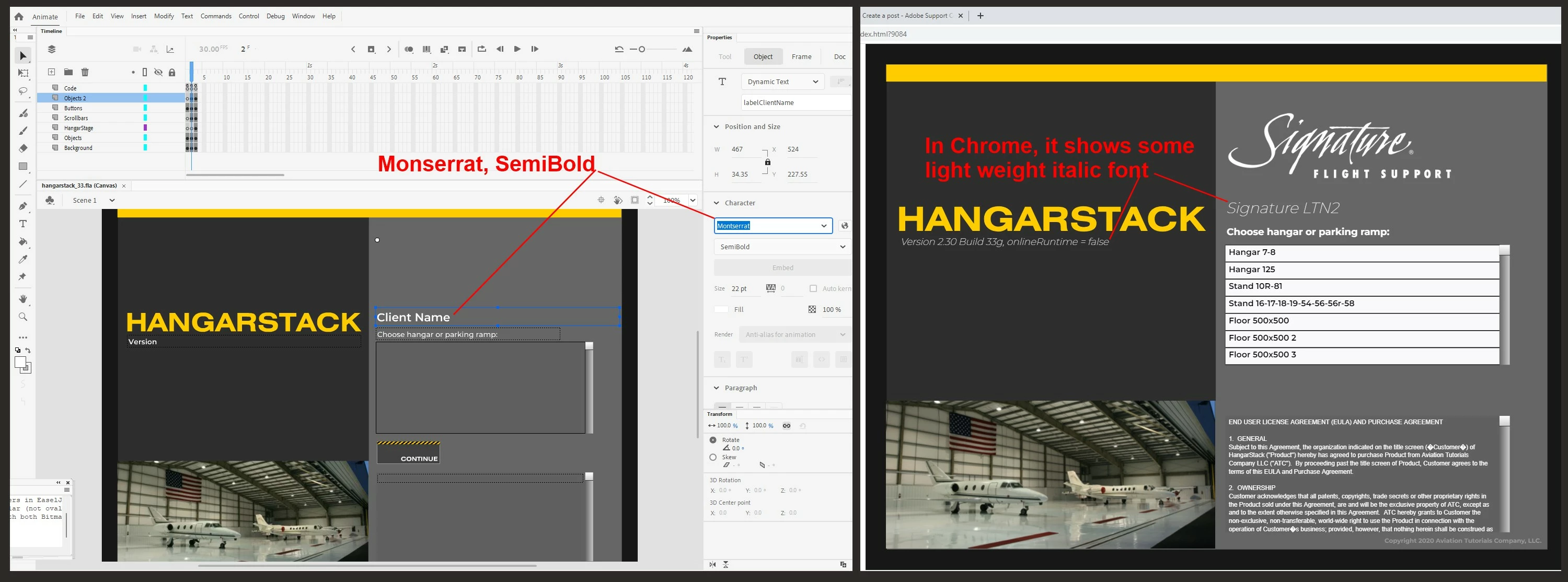
Any help is greatly appreciated.  I'm using Google Fonts: Monserrat.  The fonts have displayed properly for years, both in the editor and online.


Today, I opened my HTML5/Canvas project file in Adobe Animate, and the fonts display properly in the editor.


When I CTRL-ENTER to play it locally, or if I publish the project and view it online, the fonts are messed up.  Some other font appears, and it shows italic when it shouldn't; it shows light weight when it shouldn't.  It's like the font mapping is suddenly corrupted.  This is occuring throughout the entire project file.


Please see the attached screen shot.  Can anyone indicate what might have gone wrong?  Thank you for any help.
    This topic has been closed for replies.

    1 reply

    JoãoCésar17023019
    Community Expert
    Community Expert
    February 10, 2022

    Hi.


    I just run a test here using Montserrat and it was displayed correctly.


    What version of Animate are you using? Mine is v.22.0.2.


    Please let us know.


    Regards,

    JC

    avtutorials
    Known Participant
    February 11, 2022

    Thank you, JC.  I'm running 22.0.3 -- the latest version.  I've ran several tests here... changed the font in the text objects, published it, then changed it back to Monserrat, published it, etc.  The problem persists.  I've also asked myself what other changes, new procedures, etc., might have occurred... I cannot think of anything, other than a Windows 11 update from last night.

    JoãoCésar17023019
    Community Expert
    Community Expert
    February 11, 2022

    I see.


    It's because v22.03 is very buggy... What if you try to install v22.0.2 or another one?