
Need Help, how to delete movieclip with presskey delete
Dear All,
I dont know how to call my problem but the case is I want to delete one movieclip which I want to delete only press key delete from keyboard. here the story :
I has 4 text field there are : panjang, lebar, tinggi, name.
also 1 button called : process.
from thats I can make some rectangle as I need more then twice.
here my code :
import flash.display.MovieClip;
import flash.events.MouseEvent;
import flash.events.Event;
import fl.transitions.*;
import com.senocular.display.transform.*;
import flash.text.TextField;
import fl.transitions.easing.*;
var tool:TransformTool = new TransformTool(new ControlSetScaleSidesRotateCorners());
addChild(tool);
stage.addEventListener(MouseEvent.MOUSE_DOWN, tool.deselect);
var mc3,mc4:MovieClip;
var csname,preparedby,container,packname,packname2,dates:String;
var revision,panjang,lebar,tinggi,panjang2,lebar2,tinggi2:Number;
process2_btn.addEventListener(MouseEvent.CLICK, process2);
function process2(event:MouseEvent):void
{
panjang2 = Number(panjang2_txt.text);
lebar2 = Number(lebar2_txt.text);
tinggi2 = Number(tinggi2_txt.text);
packname2 = String(packname2_txt.text);
mc4 = new MovieClip();
mc4.buttonMode = true;
mc4.addEventListener(MouseEvent.CLICK, tool.select);
var randomColours2:int = Math.floor(Math.random() * 0xFFFFFF);
mc4.graphics.clear();
mc4.graphics.lineStyle(2, randomColours2, .5);
mc4.graphics.drawRect(0, 0, (panjang2/10)/1.3, lebar2/10);
mc4.x = 20;
mc4.y = 220;
var tf:TextField = new TextField();
tf.autoSize = "center";
tf.text = packname2+"/"+tinggi2;
tf.x = Math.round(mc4.width/2 - tf.width/2);
tf.y = Math.round(mc4.height/2 - tf.height/2);
tf.embedFonts = true;
mc4.addChild(tf);
addChild(mc4);
}
and here my pictures of my work :
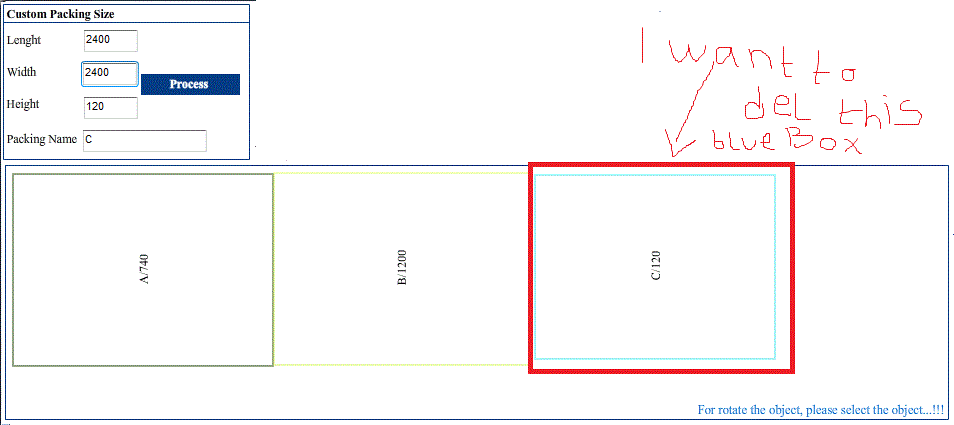
my problem comes when I want delete one of my movieclip. can anyone help me to find how to delete it??
 AdChoices