
Need help on creating Html5 canvas script for loading data progress status
I have 30mb interactive animate cc published html package as below.
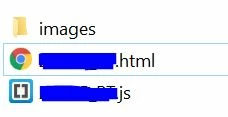
currently file loading took too much time and it was very on different pc's. (I am thinking because of internet downloading speed on different pc's). I want to show loading progress while loading. i had used default preloaded but its not helping me with my need.
below I comeup with an idea how it will look with the help of keyframe animation, but i want to modify with real time loading progress, as current ways showing 0 to 100 progress when refresh, even if data is already downloded.
any help will much approciated.
my code.
this.stop();
var a = this;
var dg = a.progressbar;
intial();
function intial(){
if(dg.currentFrame == 99)
{
a.progressbar.stop();
setTimeout(gotonext, 10);
}else{
dg.gotoAndStop(dg.currentFrame+1);
var prop = dg.currentFrame+1;//instead of currentframe I will need real time loading progress.
a.progressbar.txt.text = "Loading 3D object " + Math.round(prop * 1) + "%";
setTimeout(loopprogress, 150);// just wanted to delay the process for 38sec as current html package taking 38sec to complete loading. but regardless the time I want real time loading as data load it will show the percentage.
}
}
function loopprogress(){
setTimeout(intial, 150);
};
function gotonext(){
a.gotoAndStop(1);
}


 AdChoices