Participant
January 13, 2013
Answered

Need help with a game

  • January 13, 2013
  • 1 reply
  • 545 views

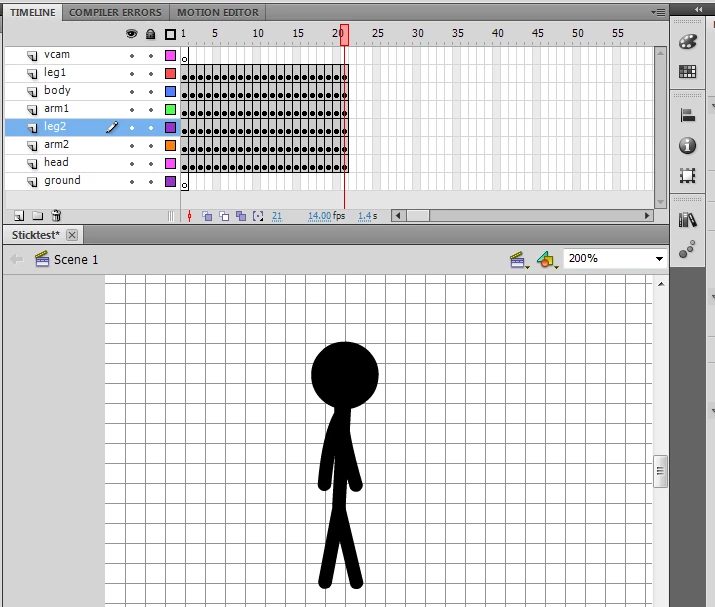
Alright so i created a stick-figure using the line tool and made the walk animation. Each part of the body has its layer and my question is how to make the stick figure move and jump using the arrow keys. So far i made the character move and jump but i also want my walk animation to start when i press the arrow key and stop. I'm still a beginner and i was messing with some code and tutorials, but i can't get it to work properly. I have already made some simple platform game with a jumping ball which was quite easy and now i decided to expand my knowledge by making something more complicated. I would appreciate some help and explanation.

This topic has been closed for replies.
Correct answer Ned Murphy

If your frame-by-frame animations are just for making the body movement, and not to actually have body changing location, then to make the object move you can use code and adjust/increment the _x and _y properties for that.

Here is some code that would make the figure move based on the arrow keys on the keyboard...  In this code, "figure is the name of the movieclip that contaons all of the body movement animations.  If the animation you show above is on the main timeline, then you need to move it inside the figure movieclip....

var increment = 3;  // adjust for speed of movement

var keyListener:Object = new Object();
Key.addListener(keyListener);

keyListener.onKeyDown = function(){
    if(Key.getCode() == 38) figure._y -= increment;  // up key
    if(Key.getCode() == 40) figure._y += increment;  // down key
    if(Key.getCode() == 37) figure._x -= increment; // left key

    if(Key.getCode() == 39) figure._x += increment; // right key

}

1 reply

Ned Murphy
Ned MurphyCorrect answer
Legend
January 13, 2013

If your frame-by-frame animations are just for making the body movement, and not to actually have body changing location, then to make the object move you can use code and adjust/increment the _x and _y properties for that.

Here is some code that would make the figure move based on the arrow keys on the keyboard...  In this code, "figure is the name of the movieclip that contaons all of the body movement animations.  If the animation you show above is on the main timeline, then you need to move it inside the figure movieclip....

var increment = 3;  // adjust for speed of movement

var keyListener:Object = new Object();
Key.addListener(keyListener);

keyListener.onKeyDown = function(){
    if(Key.getCode() == 38) figure._y -= increment;  // up key
    if(Key.getCode() == 40) figure._y += increment;  // down key
    if(Key.getCode() == 37) figure._x -= increment; // left key

    if(Key.getCode() == 39) figure._x += increment; // right key

}

AcaryusAuthor
Participant
January 14, 2013

Thanks Ned! I will definitely try this