Participating Frequently
September 6, 2018
Question

No the PolyStar Tool : (

  • September 6, 2018
  • 2 replies
  • 904 views

Hi

How i back the tool PolyStar to Tab "Tools"?

No the PolyStar Tool in Tools:
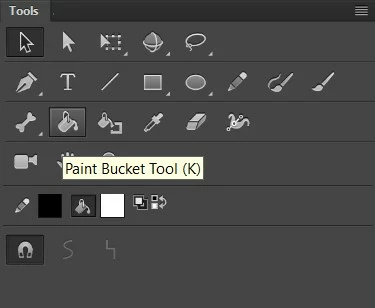
Thanks

    This topic has been closed for replies.

    2 replies

    Legend
    September 6, 2018

    I'm guessing you're trying to say, "How do I get the PolyStar tool back in Tools? There is no PolyStar tool in Tools."

    Try restoring your preferences to defaults:

    In the Preferences dialog box, click Reset to Defaults or press and hold Control+Alt+Shift (Windows) or Command+Option+Shift (Mac OS) as you start Animate.

    If that doesn't work you might have to manually delete the user preference files.

    Participating Frequently
    September 6, 2018

    sorry on my English haha

    It don't work : (

    Legend
    September 6, 2018

    Time to try resetting manually then.

    Re: panels and window go black

    Asymetrical
    Inspiring
    September 6, 2018

    What version of Animate are you using? I am using the 2017 version and it's there.

    Participating Frequently
    September 6, 2018

    CC 2017

    No the tool