
Inspiring
July 26, 2015
Question

open a pdf with AS3 on AIR app

  • July 26, 2015
  • 6 replies
  • 8096 views

Hi,

I'm trying to open a pdf when the user click on a button, for an AIR app.

Here's my code for that :

perso.addEventListener(MouseEvent.CLICK, print, false, 0, true);

function print(event:MouseEvent):void{

var myPDF = new URLRequest("tout.pdf");

navigateToURL(myPDF);

}

Problem : it's working on the emulator of Adobe flash CC, but when I'm installing the apk on an Android device, it doesn't work. (nothing happen when I click on "perso").

Any idea what could be wrong ?

(Note : I've add the "tout.pdf" to my apk in the publish setting like that :
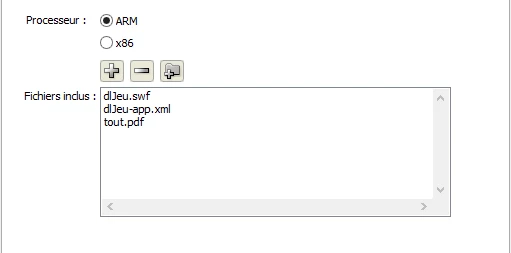
)

This topic has been closed for replies.

6 replies

lucasp35885850
Participating Frequently
April 21, 2018

Consegui definir a causa o problema! A resolução do app diferente do sistema operacional (windows), se o app estiver nas mesmas dimensões este problema não acontece. Só não sei como poderia resolver isso, pois uso StageDisplayState.FULL_SCREEN para se adaptar em qualquer resolução.

lucasp35885850
Participating Frequently
April 20, 2018

Eu usei um HtmlLoader, conforme a documentação da Adobe: https://help.adobe.com/pt_BR/as3/dev/WS5b3ccc516d4fbf351e63e3d118666ade46-7eb4.html

Porém tem um problema para poder fechar o arquivo, estou tentando descarregar e ele não sair da tela.

JoãoCésar17023019
Community Expert
Community Expert
April 20, 2018

Hi. Use removeChild(). Like this:

Oi. Use removeChild(). Tipo assim:

import flash.net.URLRequest;

import flash.events.MouseEvent;

import flash.html.HTMLLoader;

var request:URLRequest = new URLRequest("b.pdf");

var pdf = new HTMLLoader();

pdf.height = 800;

pdf.width = 600;

pdf.load(request);

container.addChild(pdf);

button.addEventListener(MouseEvent.CLICK, onClick);

function onClick(e:MouseEvent):void

{

    container.removeChild(pdf);

}

lucasp35885850
Participating Frequently
April 21, 2018

Oi João César,

Eu criei um projeto novo somente para testar esta funcionalidade e tudo funcionou normalmente,

porém no projeto que estou trabalhando, simplesmente, não funciona a descarga.

Como o meu projeto tem várias classes, pensei que talvez fosse o nível que a classe HtmlLoad estava, então coloquei na classe Main( vinculado ao projeto .Fla) e isso também não resolveu. Já verifiquei as versões do SDK...

Descobri agora!

Se o projeto estiver em uma resolução/dimensão de 1366 x 768px (HD) o descarregamento funciona, se mudar para

FullHd 1920x1080px não acontece!

Alguma dica para resolver isso?

sinious
Legend
December 15, 2016

On Android I like to allow the user to choose any PDF viewing app, which does unfortunately take the user out of the experience but allows pressing both pressing the back button to reverse to the previous view stack (your app usually) and all the functionality of a more advanced PDF viewer.

I do that mostly because around version 19-20is and before, StageWebView does not display PDF on Android. It does work on iOS, and rather well, so it was always a shame. Are you saying they implemented native viewing in Android now?

RobRusher
Participating Frequently
August 4, 2015

Did you try StageWebView? This has worked for me in the past.

var webView:StageWebView = new StageWebView();

      webView.stage = this.stage;

      webView.viewPort = new Rectangle(50,50,this.stage.stageWidth-100, this.stage.stageHeight-100);

      webView.addEventListener(Event.COMPLETE, this._onLoadComplete);

      webView.loadURL("http://labsdownload.adobe.com/pub/labs/flashruntimes/shared/air4-0_flashplayer12-0_release notes.pdf");

sinious
Legend
July 30, 2015

If the PDF is too complex for HTMLLoader you should follow Android guidelines. Opening files of specific types requires, as kglad indicated, an app for doing so. You should use an ANE to invoke an intent to open the PDF and let the system deal with it if you don't have your own PDF rendering system built-in. The intent will bring up what all Android users are familiar with, the screen to choose which app will open the PDF. Often there are several to choose from and it's not uncommon to have something pre-installed, such as Adobe Acrobat or Polaris Office. It entirely depends on the manufacturers choice.

I purchased an ANE previously called DocLauncher, but this was a very long time ago. It nicely came with Java source code so I could modify it and even add more functionality if I desired. Unfortunately the software doesn't appear to be available anymore (the author did not keep up with it), yet the ANE still works for me to this day. I'm fairly sure there are alternate options for you if you search around for an ANE. I just can't give you this ANE because it is commercial. I can tell you the code in it is extremely simple if you want to get your feet wet in Java. You send the PDF full path to the ANE which verifies it exists, creates a context, creates an intent (Intent.ACTION_VIEW), sets the intents setDataAndType(fileURI, mimeType), then starts an Activity activity = theContext.getActivity() and then starts it up activity.startActivity(intent). Yes it's cryptic but that general workflow is basic, albeit dated. Works up to the latest OS5.x and back to, well, way before anyone would still have those old Androids.

Known Participant
December 14, 2016

Hey sinious!

I am trying to use ANE native extension to open a pdf file with no sucess.

Could you tell me what's wrong with my code, please?

var pdf:PdfViewer;

btn.addEventListener(MouseEvent.CLICK, abrirpdf, false, 0, true);

function abrirpdf(e:MouseEvent):void

{

  pdf = new PdfViewer();

  pdf.addEventListener(PdfViewerEvent.STATUS, onStatus);

  var src:File = File.applicationDirectory.resolvePath("/pdf/meupdf.pdf");

  var dis:File = File.documentsDirectory.resolvePath(src.name);

  if (dis.exists) dis.deleteFile();

  if (!dis.exists) src.copyTo(dis, true);

  pdf.run(dis);

}

Thank You!

Known Participant
December 15, 2016

Problem fixed!

My code wasn't rigth and i haven't inicialize the necessary permissions.

But now, it just dont execute the pdf in pdf software and i cant realize why.

My code is that:

btn.addEventListener(MouseEvent.CLICK, abrirpdf, false, 0, true);

function abrirpdf(e:MouseEvent):void

{

  var src:File = File.applicationDirectory.resolvePath("pdf/meupdf.pdf");

  var dis:File = File.documentsDirectory.resolvePath(src.name);

  if (dis.exists) dis.deleteFile(); else src.copyTo(dis, true);

  pdf = new PdfViewer();

  pdf.addEventListener(PdfViewerEvent.STATUS, onStatus);

  texto.text="trying to open pdf file: " + pdf.run(dis);

}

Everything in running as it should, the "dis" variable has what it must have, but the output is:

"Trying o open pdf file: false";

Why ist that?

Thank you very much!

kglad
Community Expert
Community Expert
July 26, 2015

your android doesn't have a browser plugin pdf reader.

try using the htmlloader class to load your pdf.