

Outlines Changing when Flipped Horizontal
Hi All, Wondering if this is an update issue, I have just done a recent update to try and cure this issue, but when I flip a symbol, the line thickness redcuces to .25... even though it is a symbol, when I go inside to symbol to fix this, it remains the same, if I adjust the line tickness, the flipped symbol does not change, but the original symbol I can see the lines getting thicjer and thinner. Never had this issue before., Also had issue with the line styles Drop down locking so it could not be used. This at least is or seems to be fixed, but the outlines losing the applied formatting is still an issue.
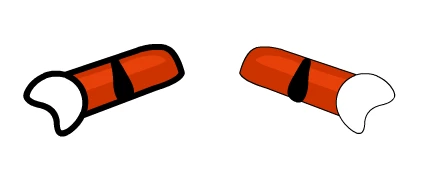
As shown above, both the Arm and the Hand are symbols, but both change thickness when flipped Horizaontally, it does not happen on the vertical.


 AdChoices