


Inspiring
Feb 18, 2021 10:05 AM UTC
Answered

paint bucket tool not working

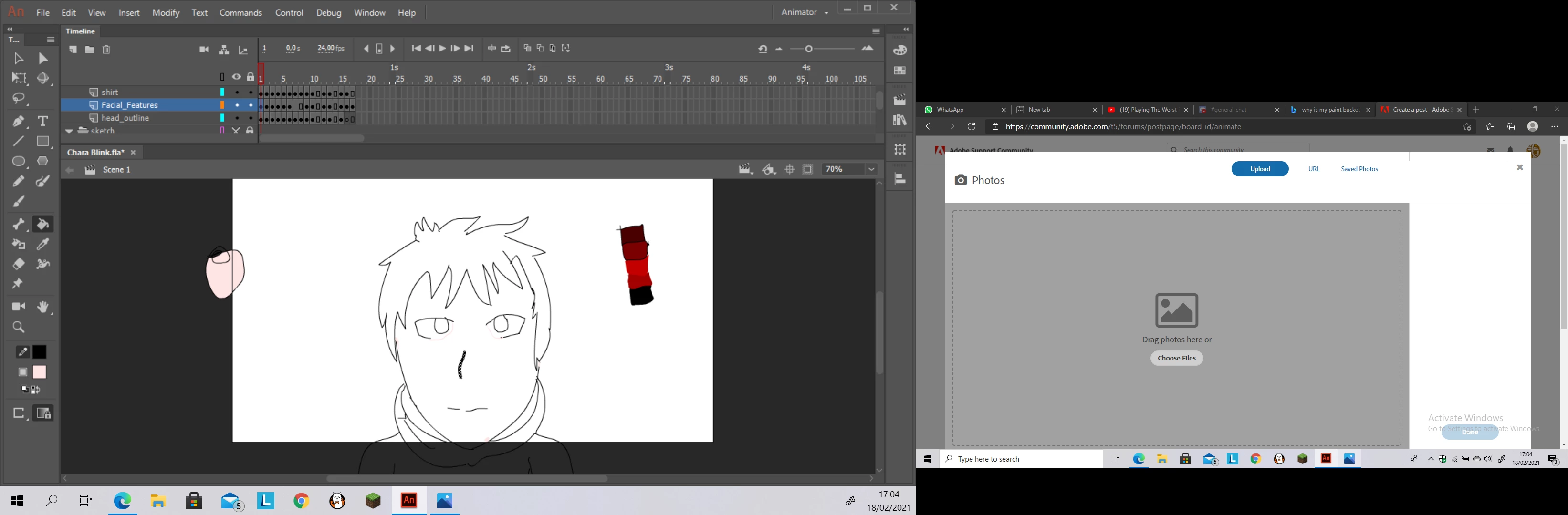
i have a simple character, i want to colour their face but its notletting me, i can colour their hair and eyes but not their face, im using adobe animate 2019 and i already tested out the gaps closing and lock fill, nothing worked
This topic is closed to new replies. Start a new post to keep the conversation going.
Undertale5CF8Correct answer
Inspiring
Mar 22, 2021 2:09 PM UTC

Quick update: so it turns out my character's face and hair wasnt in the same layer, thanks to colin holgates after our direct message discussion he told me to put the hair and the face in the same layer and it worked

im making this update just in case someone wants to know how to fix this

4 replies

Undertale5CF8AuthorCorrect answer
Inspiring
Mar 22, 2021 2:09 PM UTC

Quick update: so it turns out my character's face and hair wasnt in the same layer, thanks to colin holgates after our direct message discussion he told me to put the hair and the face in the same layer and it worked

im making this update just in case someone wants to know how to fix this

Translate
Inspiring
Mar 2, 2021 10:24 AM UTC

its not letting me put the file, i dont know what is the resonn behind this, could you send me your email if that is fine by you

Translate
Inspiring
Mar 2, 2021 10:19 AM UTC

Also forgot to say thank you for helping me with extending the length of my frame previously

so thank you

Translate
Colin Holgate
Inspiring
Mar 1, 2021 4:06 AM UTC

Are you able to put the file somewhere that we can get it, and see what is wrong?

There is a gap in the lower right of the face. Not sure if that is all that is wrong.

Translate