
Participant
May 12, 2013
Question

Papervision3D

  • May 12, 2013
  • 1 reply
  • 746 views

Hi

I want to share some problem which I can't predict. Please help me out.

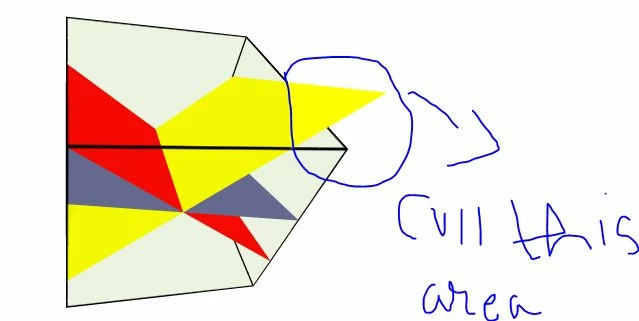
see the image below,

you see the cube in which there are three planes, see the yellow plane where I circular marked the area i want to clip, I want to clip(delete) the area which is outside of cube. So, is it possible to do with papervision? Anything?? Please help me out.

Thanks & Regards

tarryize
This topic has been closed for replies.

1 reply

Arun_Viiswanathan
Inspiring
May 13, 2013

Hi,

    Not clear about how you created the object. Are you created the cube inside papervision3D using code, Or are you imported the object from some modeling software?

Anyway try using some masking technique so that you can mask the area that you don't want to show.

Arun V

tarryizeAuthor
Participant
May 18, 2013

Hi

Thanks for the reply, I have used a  default cube of papervision3d and I add some planes inside the cube, I don't understand how to mask the papervision cube so that outer area of planes should not visible because cube is not static, it has rotation also. So, please tell me some way to sort out this problem

Arun_Viiswanathan
Inspiring
May 21, 2013

Hi,

    You can use the normal mask that you used in the AS3.But for masking you need to load some other objects to the scene

then use:

myLayer1 = viewport.getChildLayer(myobject1);

myLayer2 = viewport.getChildLayer(myobject2);

and then mask it by

myLayer1.mask = myLayer2;

I can't find any example for papervision3D masking. Hope you know its a dead project

http://wiki.flare3d.com/index.php?title=3D_Mask

In the abouve link you can find an example for masking in Flare3D engine.

Hope this helps!