Known Participant
December 5, 2017
Answered

parent/child rotation speed logic
  • December 5, 2017
  • 3 replies
  • 647 views

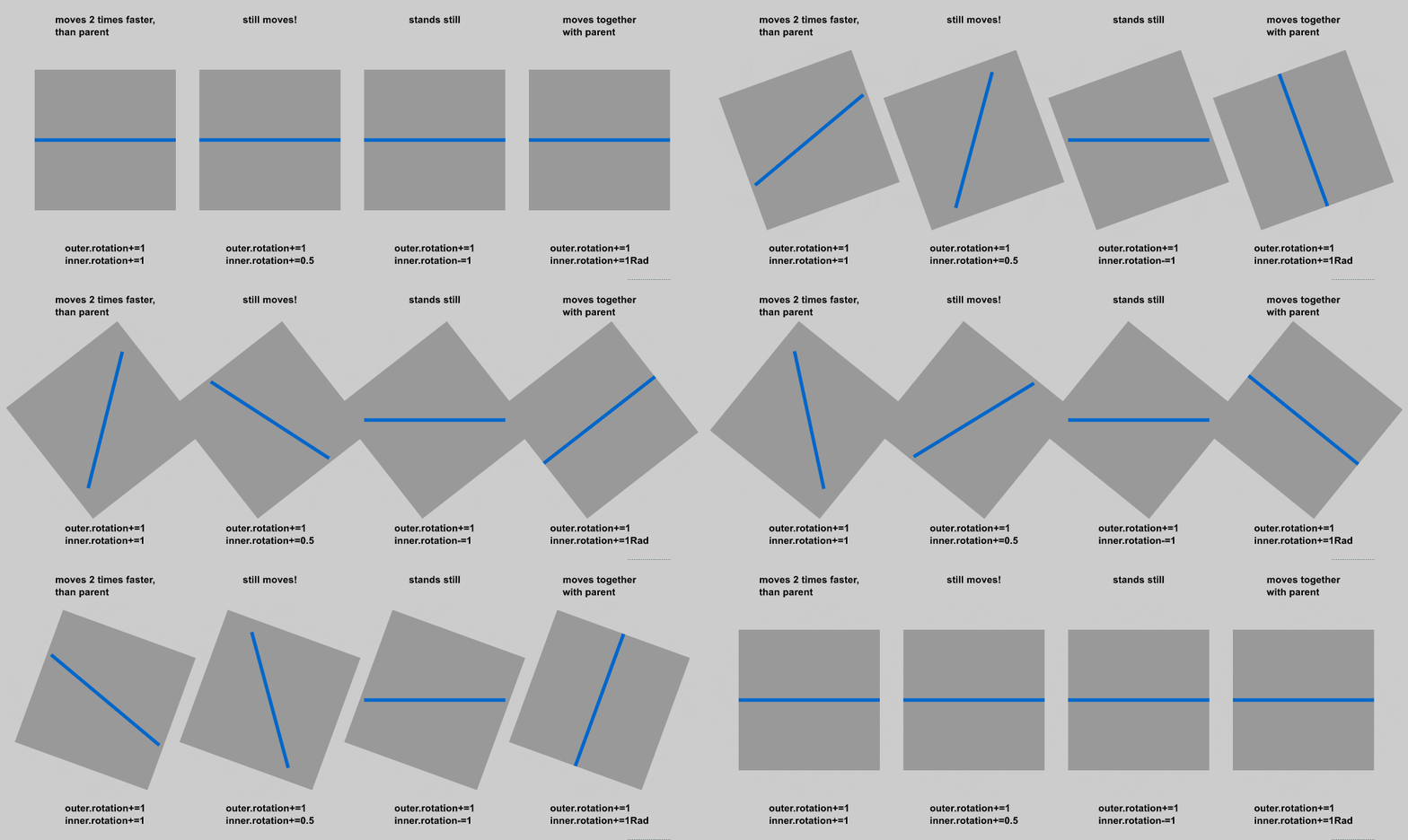
somebody can explain to me, what's going on here?

i have one mc(inner) inside another(outer).

outer.rotation+=1;

inner.rotation+=1;

result: inner mc moves two times faster, than parent. ok.

outer.rotation+=1;

inner.rotation+=0.5; (half, right?)

result: inner mc still moves!

outer.rotation+=1; (must be degree, if not defined other?)

inner.rotation+=1rad;

result: same speed.

what kind of logic stands behind this behavior?

This topic has been closed for replies.
Correct answer JoãoCésar17023019

For me it's correct.

if you want the children to rotate with the same visual orientation along with the parent, just doesn't change their rotation values.

When you rotate a parent Display Object Container object, its children rotation values remain the same. If they were at 0 degree, they will stay at 0 degree.

So, changes you cause to the rotation values of the children, if different in absolute values, will make them get a different visual orientation in relation to the parent.

If the outer rotation changes by 1 and the inner rotation changes by 0.5, at 30 fps, the outer will rotate 30 degrees during 1 second while the inner one will rotate 15.

So they must have a different visual orientation.

3 replies

Legend
December 5, 2017

arthurb65311981  wrote

outer.rotation+=1;

inner.rotation+=0.5; (half, right?)

result: inner mc still moves!

Explain why you believe the inner movieclip shouldn't move if you're incrementing its rotation.

And what is "1Rad"? There is no such constant in AS3.

Known Participant
December 14, 2017

sorry, my bad. 1rad here is 0,0174533. this equals to 1 degree in radians.

i based my opinion on rotation speed of parent.

if the child from the left example moves 2 times fast, than parent, i make logical conclusion, and ask for 0.5 rotation at each step.

Legend
December 14, 2017

The .rotation property is in degrees, not radians. Radians are so much smaller than degrees, that adding 1 radian to the rotation is almost the same as adding nothing.

Colin Holgate
Inspiring
December 5, 2017

I think the last one works because 1rad doesn't make sense, and so you're adding zero to the rotation of the line, and so it stays in sync with its parent.

To paraphrase JoãoCésar: "just don't change their rotation values.".

JoãoCésar17023019
Community Expert
JoãoCésar17023019Community ExpertCorrect answer
Community Expert
December 5, 2017

For me it's correct.

if you want the children to rotate with the same visual orientation along with the parent, just doesn't change their rotation values.

When you rotate a parent Display Object Container object, its children rotation values remain the same. If they were at 0 degree, they will stay at 0 degree.

So, changes you cause to the rotation values of the children, if different in absolute values, will make them get a different visual orientation in relation to the parent.

If the outer rotation changes by 1 and the inner rotation changes by 0.5, at 30 fps, the outer will rotate 30 degrees during 1 second while the inner one will rotate 15.

So they must have a different visual orientation.