
Inspiring
September 19, 2021
Question

Parts of my drawing suddenly filled with black.

  • September 19, 2021
  • 2 replies
  • 1285 views

Hey, so I've noticed a trend while working on backgrounds for my videos. I'll get one done and it'll look great. I'll save then when i log back in the file has decided to fill in random parts of my drawing with black. Here is a pic to show you what i'm talking about
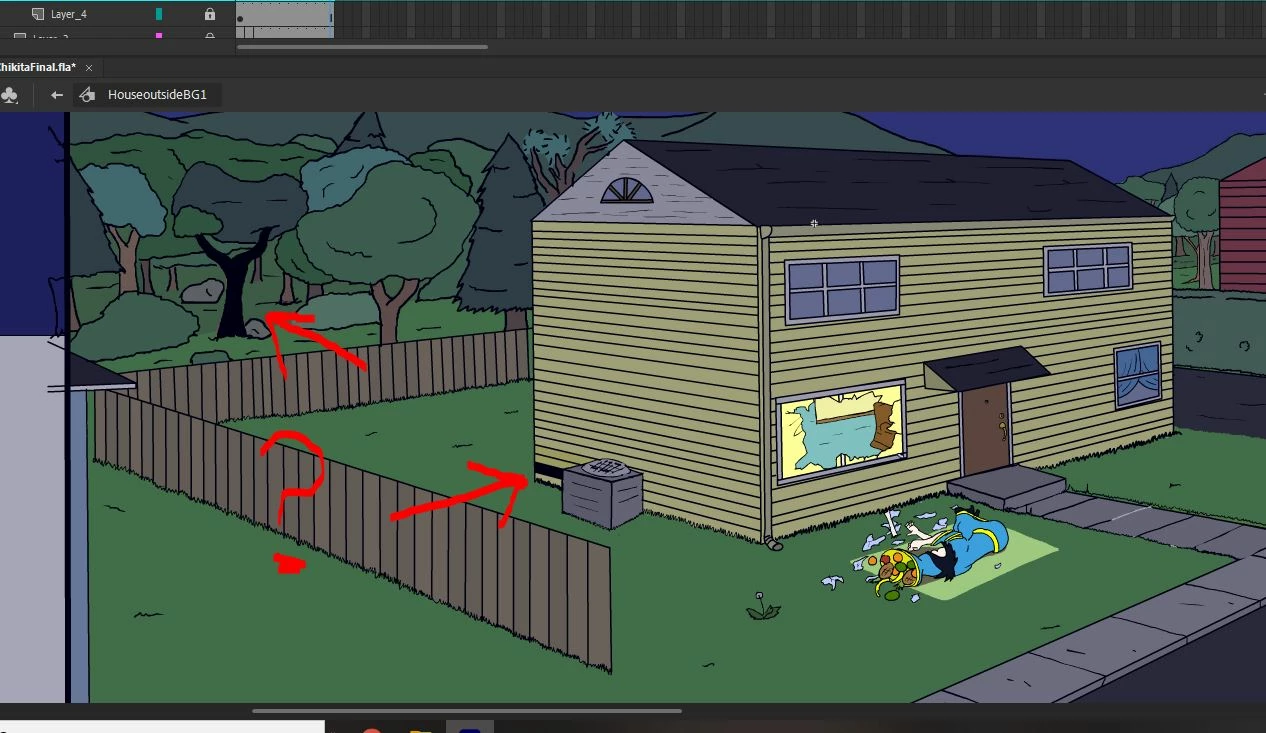
 

This is a mild example. Sometimes When i re-open a file some of the lines are all broken and look like someone raked a piece of charcoal over a paper. I'm tired of having to go back and manually color in the blacked out portions after I know I saved it without it being blacked out. Can someone tellme what's happening, or is it just another adobe-glitch?

    This topic has been closed for replies.

    2 replies

    Participating Frequently
    September 28, 2021

    I am having this issue as well. It is extremely unprofessional and ametuer that Adobe has not updated this. It is scene/app breaking. My sene is not complicated at all yet this error is making everything take 10x as long. This needs to be addressed and fixed.

    n. tilcheff
    Legend
    September 20, 2021

    Must be a glitch.

    Don't know what the structure of the background is, but from general experience, such 'glitches' happen when a drawing gets too complex with many points.

    Best practice would be to have the elements separated on multiple layers, symbols and so on. This will, hopefully, reduce the occurrence.


    What I say is purely from past experience with various versions of Flash. I don't use Animate for serious work (unreliable and unpleasant), so my observations are just from random testing.


    Nick - Character Designer and Animator, Flash user since 1998 | Member of the Flanimate Power Tools team - extensions for character animation