Participant
May 3, 2021 2:03 PM UTC
Answered

Pen Pressure not working in Animate 2021

Hello, my Animate was updated from the 2019 version to the 2021 version yesterday and now the pen pressure doesn't work anymore even when the button is activated.
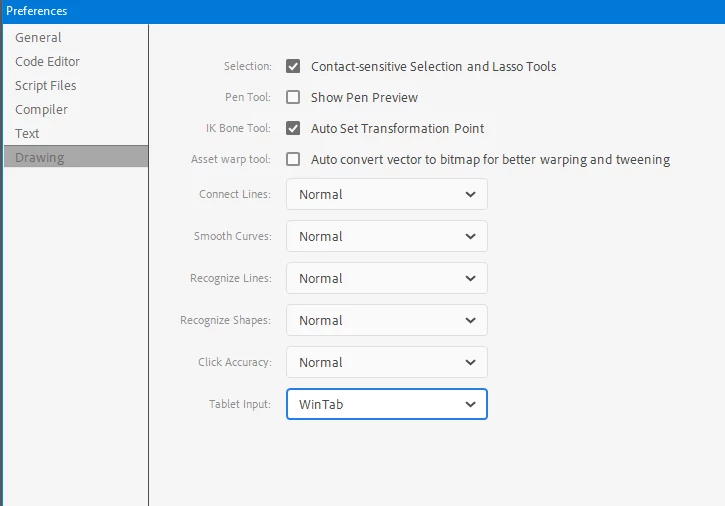
When I switch to "WinTab" under "properties > drawing" the pen pressure works but then the tablet switches to pen-mode when I only use it in mouse-mode.

Can anyone help?

I have a Wacom Intuos 3 (old but gold) and Windows 10

    n. tilcheff
    n. tilcheffCorrect answer
    Legend
    Jun 20, 2022 7:39 AM UTC

    Thank you for your answer. I think my Tablet is just too old, since the latest driver is from 2009, support probably discontinued :(. I wish there was an option for using the pen pressure function of my tablet without "Windows Ink". 


    In Animate choose WinTab from preferences and your tablet will most likely work.


    Nick - Character Designer and Animator, Flash user since 1998 | Member of the Flanimate Power Tools team - extensions for character animation

    13 replies

    _keyframer
    Community Expert
    Community Expert
    May 3, 2021 2:58 PM UTC

     "Windows Ink" needs to be Enabled in the Tablet driver for pressure to work with Animate.

    Translate
    Animator and content creator for Animate CC
    Participant
    May 3, 2021 3:57 PM UTC

    Thanks for the quick answer. Unfortunately the Windows Ink option is only available in pen-mode, not mouse-mode.

    (sorry the screenshot is in German but you get the idea)


    The pen pressure worked fine in mouse-mode in Animate 2019 because the "tablet input" tab in Animate's properties didn't even exist.

    Translate
    Participant
    Nov 25, 2021 7:40 PM UTC

    I am also having the same problem. Did you solve it ?

    Translate