Pin child image roatation and translation
Hello community,
I am working on a project that have a protractor image and a rotation-handle image for the protractor.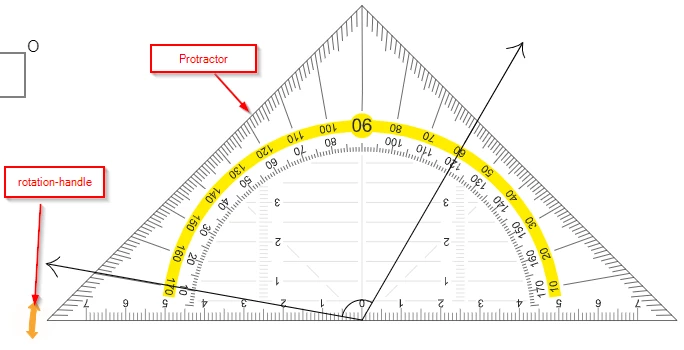
The rotation-handle rotates the protractor.
rotationHandle.on("mousedown", function (evt) {
this.parent.addChild(this);
this.offset = {
x: this.x - evt.stageX,
y: this.y - evt.stageY
};
});
rotationHandle.on("pressmove", function (evt) {
this.x = evt.stageX + this.offset.x;
this.y = evt.stageY + this.offset.y;
protractor.rotation = rotationHandle.rotation = Math.atan2(protractor.y - this.y, protractor.x - this.x) * 180 / Math.PI;
});
The issue is that when I move the protractor, I need to move the rotation-image too.
protractor.on("mousedown", function (evt) {
this.parent.addChild(this);
this.offset = {
x: this.x - evt.stageX,
y: this.y - evt.stageY
};
});
protractor.on("pressmove", function (evt) {
this.x = evt.stageX + this.offset.x;
this.y = evt.stageY + this.offset.y;
});
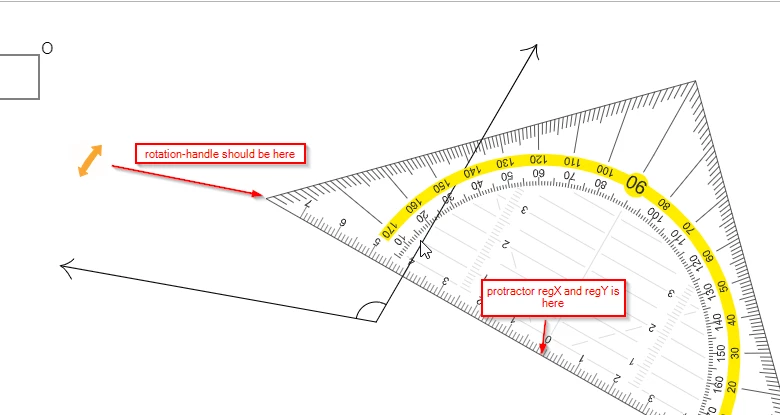
can anybody please tell me how to achieve that.
Thanks.
 AdChoices