


Known Participant
July 23, 2020
Answered

play from currentFrame and stop on targeted frames in animate CC (html5)

  • July 23, 2020
  • 1 reply
  • 1878 views

I was struggling with this code and still not find correct way of doing this. so posted here.


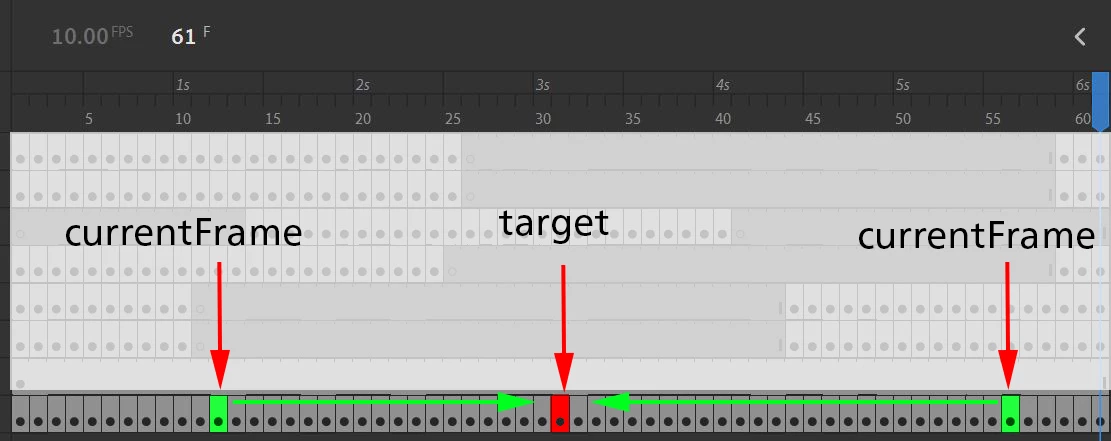
All frame are in my nested movieclip (mc_1). now I want to go on target frame by clicking on the button inside movieclip from the currentFrame as shown in below image.
here is my code:


this.stop();

var a = this;

a.mc_1.t.addEventListener("click",test_1)
function test_1(){
if(a.mc_1.currentFrame > 0){
var tds = 29 +(a.mc_1.currentFrame-a.mc_1.currentFrame); //wanted to get targeted frame number
a.stage_freezeobject.gotoAndStop(tds); \\ this will directily jump onto frame29 but I wanted to play from current frame and stop on 29.
}

any help will much appreciate.


below are 2 examples of two different currentFrames and play direction whereas 1 direction is normal play and 2nd direction is reverse play. it will be good if both ways are possible, if not, then 1 of this will fullfill my need.

 

    This topic has been closed for replies.
    Correct answer kglad

    when currentFrame > target frame, you need to start a loop (eg, ticker) to play backwards and if < play forwards.  eg


    // assuming target is defined
    function test_1(){
    if(a.mc_1.currentFrame > target && !createjs.Ticker.hasEventListener("tick")){ 
    createjs.Ticker.addEventListener("tick", reversePlayF);
    } else if(a.mc_1.currentFrame < target && !createjs.Ticker.hasEventListener("tick")){ 
    a.mc_1.play();
    createjs.Ticker.addEventListener("tick", playF);
    }
    }
    function reversePlayF() { a.mc_1.gotoAndStop(a.mc_1.currentFrame-1);
    if(a.mc_1.currentFrame==target){
    createjs.Ticker.removeEventListener("tick", reversePlayF);
    }
    
    function playF{
    if(a.mc_1.currentFrame == target){
    a.mc_1.stop();
    createjs.Ticker.removeEventListener("tick", playF);
    } }

    1 reply

    kglad
    Community Expert
    kgladCommunity ExpertCorrect answer
    Community Expert
    July 23, 2020

    when currentFrame > target frame, you need to start a loop (eg, ticker) to play backwards and if < play forwards.  eg


    // assuming target is defined
    function test_1(){
    if(a.mc_1.currentFrame > target && !createjs.Ticker.hasEventListener("tick")){ 
    createjs.Ticker.addEventListener("tick", reversePlayF);
    } else if(a.mc_1.currentFrame < target && !createjs.Ticker.hasEventListener("tick")){ 
    a.mc_1.play();
    createjs.Ticker.addEventListener("tick", playF);
    }
    }
    function reversePlayF() { a.mc_1.gotoAndStop(a.mc_1.currentFrame-1);
    if(a.mc_1.currentFrame==target){
    createjs.Ticker.removeEventListener("tick", reversePlayF);
    }
    
    function playF{
    if(a.mc_1.currentFrame == target){
    a.mc_1.stop();
    createjs.Ticker.removeEventListener("tick", playF);
    } }
    aavp1020Author
    Known Participant
    July 24, 2020

    Thank you so much.

    kglad
    Community Expert
    Community Expert
    July 24, 2020

    you're welcome.