


lidiya_127
Inspiring
November 20, 2020
Answered

Probelm with frame effects showing up

  • November 20, 2020
  • 2 replies
  • 280 views

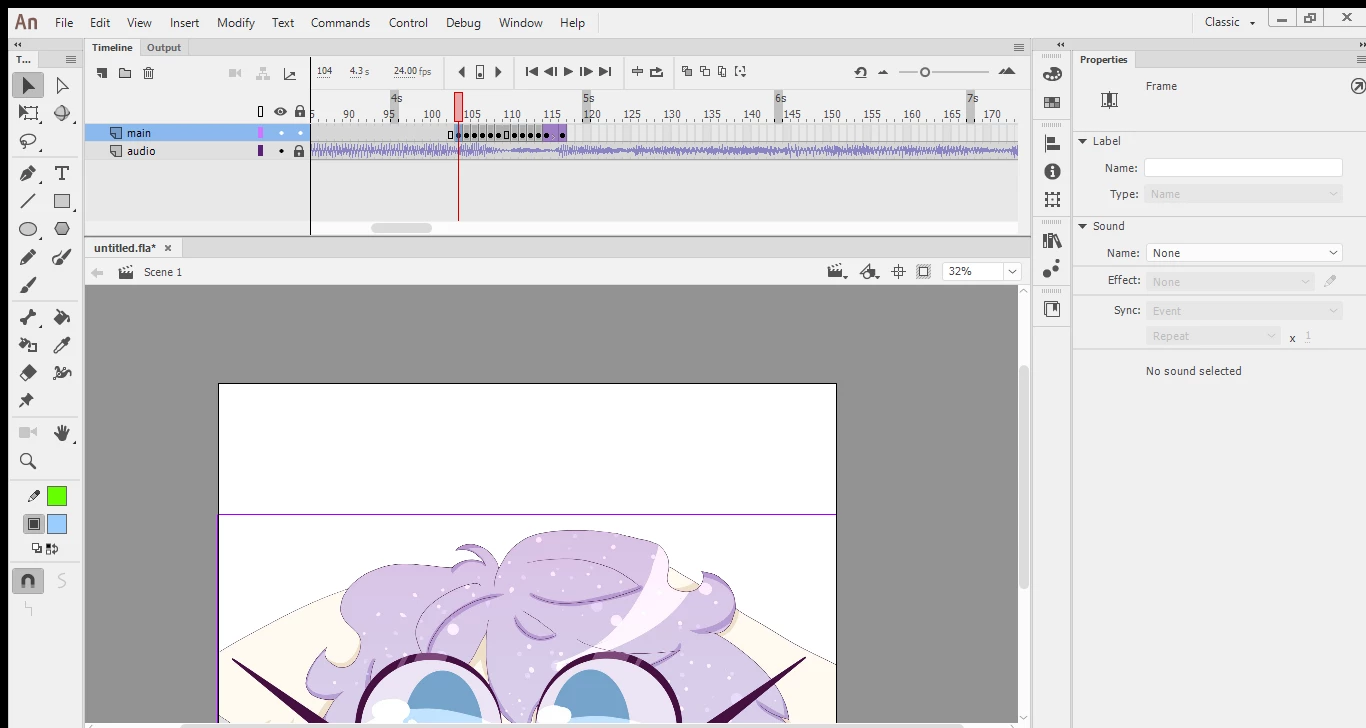
The frame effects are not showing up in the frame properties im not sure what to do.
    This topic has been closed for replies.
    Correct answer n. tilcheff

    Hi mate,


    Effects can only be applied to symbols.


    Up until Animate 2019 (when they introduced the so called Advanced Layers) filters could only be applied to Movie Clip symbols, but not Graphics.


    I can see that you have a version earlier than 2020 as it is displaying the red 'playback head'.


    To apply Effects, convert your work to a Graphic Symbol.

    To apply Filters, each frame must be a Movie Clip.


    2 replies

    n. tilcheff
    n. tilcheffCorrect answer
    Legend
    November 20, 2020

    Hi mate,


    Effects can only be applied to symbols.


    Up until Animate 2019 (when they introduced the so called Advanced Layers) filters could only be applied to Movie Clip symbols, but not Graphics.


    I can see that you have a version earlier than 2020 as it is displaying the red 'playback head'.


    To apply Effects, convert your work to a Graphic Symbol.

    To apply Filters, each frame must be a Movie Clip.


    Nick - Character Designer and Animator, Flash user since 1998 | Member of the Flanimate Power Tools team - extensions for character animation
    kglad
    Community Expert
    Community Expert
    November 20, 2020

    try changing your workspace to see if that helps.  if it does not, what animate version is that and is that a canvas project?

