Known Participant
January 30, 2019
Answered

Problem using the List Box component Flash Pro CS6 and AS3

  • January 30, 2019
  • 2 replies
  • 778 views

Hi all. I am making an application to convert from one unit to another. I am using the List Box component. The user has to enter the input value in an input text field, select the unit which has to be converted from the list box and the result is displayed in the result text field. The problem is this: when an input value has been entered in the input field and the result for a given unit has been calculated, changing the input value and clicking on the same label item does not reflect the new result. Another unit has to be selected and then one has to go back to the unit for which the input has to be converted. I have attached screenshots (for converting Deciliters to Centiliters) here under to illustrate my explanation:
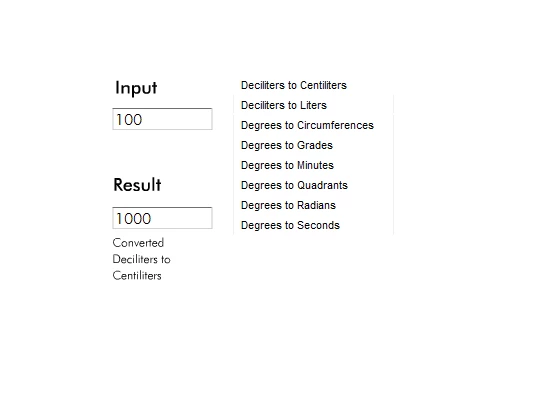
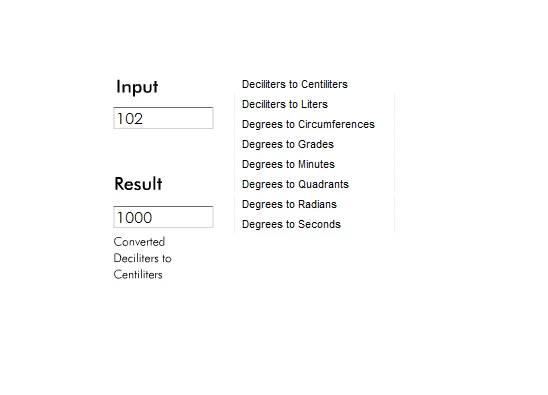
What line of code should I use or add to my code to solve this problem? The AS3 code I wrote is shown here under. I am new to AS3, so please bear with me. I am using Adobe Flash Pro CS6 on a 32-bit Windows-7 machine.

stop();

//The Text Boxes

var txtBox:TextFormat=new TextFormat();

txtBox.size = 16;

txtBox.color = 0x000000;

txtBox.font = "futura lt bt";

numIn.setStyle("textFormat",txtBox);

numOut.setStyle("textFormat",txtBox);

//The List Boxes

listBox.height = 160;

listBox.width = 160;

listBox.addItem({label: "Deciliters to Centiliters"});

listBox.addItem({label: "Deciliters to Liters"});

listBox.addItem({label: "Degrees to Circumferences"});

listBox.addItem({label: "Degrees to Grades"});

listBox.addItem({label: "Degrees to Minutes"});

listBox.addItem({label: "Degrees to Quadrants"});

listBox.addItem({label: "Degrees to Radians"});

listBox.addItem({label: "Degrees to Seconds"});

//The List Box Functions

//First box

listBox.addEventListener(Event.CHANGE, dCalFn);

function dCalFn (event:Event):void

{

     var ni:Number=Number(numIn.text);

     var no:Number=Number(numOut.text);

     if (ni>=0)

     {

          switch (listBox.selectedItem.label)

          {

               case ("Deciliters to Centiliters"):

               {

                    no = Math.round((ni*10)*1000)/1000;

                    break;

               }

               case ("Deciliters to Liters"):

               {

                    no = Math.round((ni*0.1)*1000)/1000;

                    break;

               }

               case ("Degrees to Circumferences"):

               {

                    no = Math.round((ni*0.0027778)*1000)/1000;

                    break;

               }

               case ("Degrees to Grades"):

               {

                    no = Math.round((ni*1.1111111)*1000)/1000;

                    break;

               }

               case ("Degrees to Minutes"):

               {

                    no = Math.round((ni*60)*1000)/1000;

                    break;

               }

               case ("Degrees to Quadrants"):

               {

                    no = Math.round((ni*0.0111111)*1000)/1000;

                    break;

               }

               case ("Degrees to Radians"):

               {

                    no = Math.round((ni*0.0174533)*1000)/1000;

                    break;

               }

               case ("Degrees to Seconds"):

               {

                    no = Math.round((ni*3600)*1000)/1000;

                    break;

               }

          }

     textOut.text = ("Converted\n"+listBox.selectedItem.label);

     numOut.text=String(no);

     }

     if (numIn.text == String(""))

     {

          textOut.text = ("No conversion");

          numOut.text = String("No Value");

     }

}

This topic has been closed for replies.
Correct answer kdmemory

Just wanted to know though, what if there was more than one list box? Then what would need to be done to the code? I added the following to the code you suggested:

function numInChangeHandler(event: Event): void

    if (listBox.selectedIndex != -1)

    { 

        dCalFn(event); 

    }

    if (listBox1.selectedIndex != -1)

    { 

        dCalFn1(event); 

    }

}

I also added the following code in each of the converter functions (dCalFn and dCalFn1) after the condition checking using "Switch" statement

labelSelect.text = ("Selected:\n"+listBox.selectedItem.label); //For dCalFn

labelSelect.text = ("Selected:\n"+listBox1.selectedItem.label); //For dCalFn1

However, it does not update the labelSelect field correctly nor does it do the conversion correctly if I go back and forth between the two List Boxes. It works the first time I move from one List Box to another, just does not work if I move back and forth between the two List Boxes.


Hi

in the scenario that you have got only one of each: numIn, numOut, textOut, labelSelect

and only one function numInChangeHandler()

you have to distinguish which listBox is currently active, meaning which one has a selected item. Then you also must make sure that a selected item of the opposite listBox is deselected so far as one was selected previously.

Add a variable

var activeList: String;

before adding eventhandlers to the listBoxes.

then the eventhandlers (obviously you did this already)

listBox.addEventListener(Event.CHANGE, dCalFn); // line 36

listBox1.addEventListener(Event.CHANGE, dCalFn1);

numIn.addEventListener(Event.CHANGE, numInChangeHandler);

next the function numInChangeHandler

function numInChangeHandler(event: Event): void {

    if (activeList == "lbox") {

        dCalFn(event);

    } else if (activeList == "lbox1") {

        dCalFn1(event);

    }

}

If none of the listBoxes has yet a selected item, activeList has no value and nothing would happen here.

further in dCalFn

function dCalFn(event: Event): void {

    activeList = "lbox";

    if (listBox1.selectedIndex != -1) {

        listBox1.selectedItem = undefined; //to remove a selected item in the opposite listBox

    }

     //... continue with the function statements

}

and in dCalFn1

function dCalFn1(event: Event): void {

    activeList = "lbox1";

    if (listBox.selectedIndex != -1) {

        listBox.selectedItem = undefined; //to remove a selected item in the opposite listBox

    }

     //... continue with the function statements

}

that's pretty much it.

Klaus

2 replies

kdmemory
Inspiring
January 30, 2019

Hi

You might make it that when an item in your listBox is already selected and remains the same, when a new number is entered in numIn, that the numOut value adapts instantaneously. Add after line 36 (your script above) the following:

listBox.addEventListener(Event.CHANGE, dCalFn); // line 36

numIn.addEventListener(Event.CHANGE, numInChangeHandler);

function numInChangeHandler(event: Event): void {

    if (listBox.selectedIndex != -1) {

        dCalFn(event);

    }

}

Klaus

Known Participant
January 31, 2019

Thank You!!! This works well. Just wanted to know though, what if there was more than one list box? Then what would need to be done to the code?

kdmemory
Inspiring
January 31, 2019

alactionscript3noob  wrote

Thank You!!! This works well.

Glad I could help.

Klaus

JoãoCésar17023019
Community Expert
Community Expert
January 30, 2019

Hi.

You need to add at least three useful events to the input text field for this kind of situation:

- Change event;

- Focus event;

- Keyboard event.

So your convert function will be called everytime the user either changes the text, clicks in it or presses say the enter key.

Like this:

import flash.events.Event;

import flash.events.FocusEvent;

import flash.events.KeyboardEvent;

import flash.ui.Keyboard;

function changeHandler(e:Event):void

{

    convert();

}

function focusInHandler(e:FocusEvent):void

{

    convert();

}

function keyDownHandler(e:KeyboardEvent):void

{

    if (e.keyCode == Keyboard.ENTER)

        convert();

}

function convert():void

{

    trace("convert");

}

yourTextField.addEventListener(Event.CHANGE, changeHandler);

yourTextField.addEventListener(FocusEvent.FOCUS_IN, focusInHandler);

yourTextField.addEventListener(KeyboardEvent.KEY_DOWN, keyDownHandler);

I hope this helps.

Regards,

JC

Known Participant
January 31, 2019

Thank You for your reply, but I'm going with Klaus' solution.