Participating Frequently
September 13, 2010
Answered

problem with stop command and buttons

  • September 13, 2010
  • 2 replies
  • 895 views

Hi everyone.

Here is my scenario

I have a project where i have 5 buttons (all on seperate layers) that i want to link to frame 2, frame 3 frame 4, frame 5 and frame 6.

So for example i want my about button to link to frame 2 and latest news button to link to frame 3

The seperate pages are housed on the 'page layer' layer.

Please see the image below to see what i mean
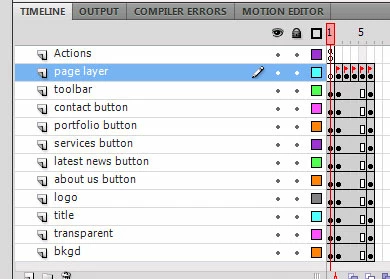
I am using the built in code snippets in cs5 to do this, therefore i am using the 'click go to frame and play' command and changing the frame number accordingly.

My problem arises when i use the stop command on the first frame. If i dont use the command the swf cycles through the 6 frames continously, but when i do use the stop command the buttons do not work as the application has stopped.

Could anyone shed any light on this problem??

This topic has been closed for replies.
Correct answer Ned Murphy

It may be a case of your using gotoAndPlay() where you need gotoAndStop().  If you are on the frame you tell to go to and play, it can't go anywhere to get there and the stop there is already used up, so it will play thru to the next stop.

2 replies

Participating Frequently
September 13, 2010

Spot on Ned

Thanks a million!

Ned Murphy
Legend
September 13, 2010

You're welcome

Inspiring
September 13, 2010

First, make Actions frame extend through entire timeline.

Participating Frequently
September 13, 2010

Thankyou

I discovered this as soon as i posted the question( always the case)

I have added a stop command to all 5 frames to stop the swf from scrolling through to the next frame once the button is pressed.

My only problem now is that if you re click on the same button once it has been clicked it scrolls through to the next page rather than just staying put.

Does anyone know why?

Inspiring
September 13, 2010

It is difficult to tell without seeing code.

Also, if the layers contain the same objects - remove all the keyframes except for the first one. For instance, if contact button is on its layer for all 6 frames - remove keyframes from frame 2 and 6.