

Demikasumii
Participant
April 22, 2022
Question

Problems on looping entire timeline

  • April 22, 2022
  • 1 reply
  • 351 views

Hi everyone!

I am a newbie on Animate and I encounter a problems on looping the entire timeline when create my html 5 banner with online tutorials.


I have total of 3 scene in the banner.

I imported all the element from Illustrator, and named the layer with “S1” “S2” and “S3” .
I animate the elements inside each layer.
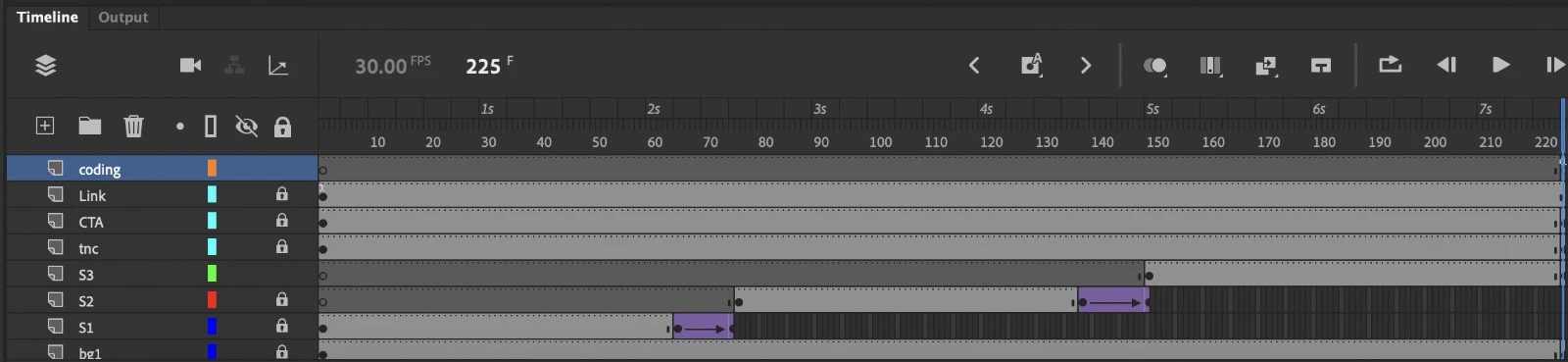
When I finished the animation, I added a new layer call “coding” and add the action:
if (!this.looped) this.looped = 1;
if (this.looped++ == 3) this.stop();


But it just keep looping Scene 3 after playing the banner once, instead of looping the whole timeline.
And it didn’t stop when it play 3 times.


I try to use gotoAndPlay(X) instead, but I cannot stop looping suscessfully.

It would be great if anyone can give me a helping hand. Thank you so much!

This topic has been closed for replies.

1 reply

JoãoCésar17023019
Community Expert
Community Expert
April 22, 2022

Hi.


There are no scenes in HTML5 documents. Please check if you really using the HTML5 Canvas document.


Please let us know.


Regards,

JC

Demikasumii
Participant
April 22, 2022

Hi JC! Thank you for your reply!


Yes I am using html5 canvas.

what I mean in "scene" is like I have 3 motion graphics to show totally. So I put it in different layers and set it play for 2.5 seconds in the timeline.

But when I try to loop the whole timeline, it always just playing the last motion graphics. It  cannot play from the beginning.

Sorry to make you confuse!

JoãoCésar17023019
Community Expert
Community Expert
April 22, 2022

No problem!


Can you confirm if the symbols in layers S1, S2, and S3 are all Graphics?