

eytanrose
Inspiring
December 15, 2021
Answered

Problems with Asset Warp after 22 update

  • December 15, 2021
  • 2 replies
  • 1039 views

I made some animations using asset warps on shape elements, that worked fine. after the last update, problem started:
first, the warped shapes lost their strokes - left with only fills.
second, It's now impossible to double-click the asset and modify the shape, like I did before.
third, when I try to create those animations again - it turns the shapes to BMP, which I don't want because I used shapes with "Scale: None".

and the worsed of all - I apply easing on the tween of the warp animation, and it has no effect. no matter what easing I set - the animation comes out linear (like: "Classic Ease: 0").

the Asset Warp function work much worse now then before the update. WHY??!!
    This topic has been closed for replies.
    Correct answer arvind_bv


    Issue 1: first, the warped shapes lost their strokes - left with only fills.

    Answer: Does this happen with all the previous version file? Can you share a sample file with us for investigation?


    Issue 2: second, It's now impossible to double-click the asset and modify the shape, like I did before.

    Answer: Changing the base shape after creating the rig has implications on other keyframes as now the rig is tightly coupled with base shape. You can break it apart to do further editing.


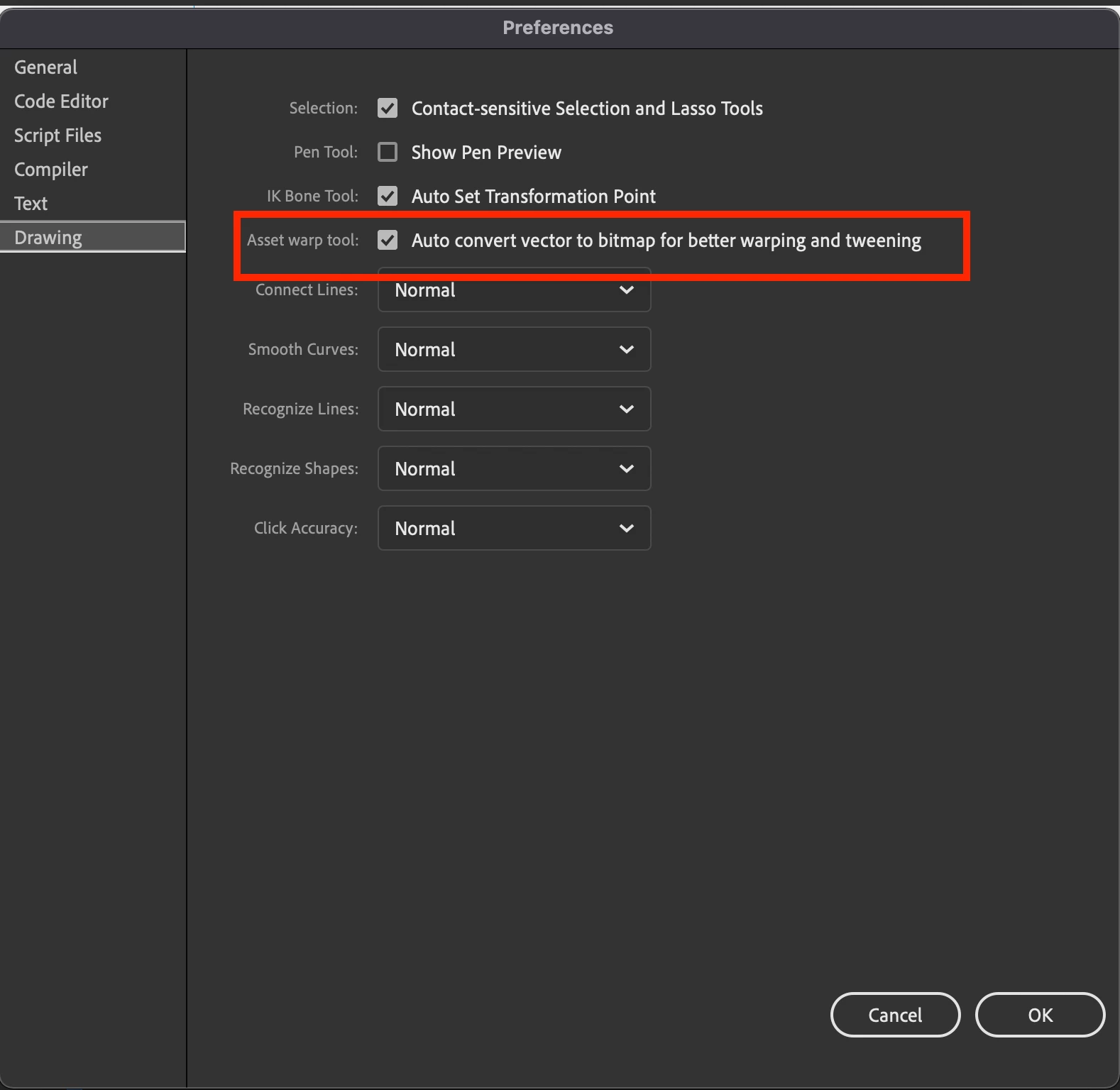
    Issue 3: third, when I try to create those animations again - it turns the shapes to BMP, which I don't want because I used shapes with "Scale: None".

    Answer: Now vectors are converted into bitmaps while converting it to rigged objects for better warping and tweening quality. However you can turn OFF this behaviour in the preferences as below.


    Issue 4: the worsed of all - I apply easing on the tween of the warp animation, and it has no effect. no matter what easing I set - the animation comes out linear (like: "Classic Ease: 0").

    Answer:  In general it works fine at our end. Can you please share sample file with the issue?


    Thanks!


    2 replies

    _keyframer
    Community Expert
    Community Expert
    December 15, 2021

    "I apply easing on the tween of the warp animation, and it has no effect. no matter what easing I set - the animation comes out linear (like: "Classic Ease: 0")."


    Classic Ease set to "0" is actually no easing at all. You have to change "0" to a value other than "0". You have from -100 all the way to 100. Change that value and you'll see easing applied.

    Animator and content creator for Animate CC
    arvind_bvCorrect answer
    Adobe Employee
    December 15, 2021


    Issue 1: first, the warped shapes lost their strokes - left with only fills.

    Answer: Does this happen with all the previous version file? Can you share a sample file with us for investigation?


    Issue 2: second, It's now impossible to double-click the asset and modify the shape, like I did before.

    Answer: Changing the base shape after creating the rig has implications on other keyframes as now the rig is tightly coupled with base shape. You can break it apart to do further editing.


    Issue 3: third, when I try to create those animations again - it turns the shapes to BMP, which I don't want because I used shapes with "Scale: None".

    Answer: Now vectors are converted into bitmaps while converting it to rigged objects for better warping and tweening quality. However you can turn OFF this behaviour in the preferences as below.


    Issue 4: the worsed of all - I apply easing on the tween of the warp animation, and it has no effect. no matter what easing I set - the animation comes out linear (like: "Classic Ease: 0").

    Answer:  In general it works fine at our end. Can you please share sample file with the issue?


    Thanks!


    eytanrose
    eytanroseAuthor
    Inspiring
    December 16, 2021

    Thanks for the quick reply.

    It seems we can't share FLA files on the Creative Cloud, so how do I share a sample file with you?

    Now, as for your answers:

    Issue 1: this didn't happen to all assets - just some. this makes me think it's a bug.

    Issue 2: that's a shame. breaking apart means I have to redo all the warp animation. It was possible to change the base shape before, and once you did that - all the animated keyframes were automatically updated. I hope it will be possible again.

    Issue 3: found it, fixed it - thank you.

    Issue 4: after some experiments, I found that easing works only with "Classic Ease" (like 100 or -100). it doesn't work with easing graphs - not the preset graphs and definitely not custom ones. It’s less comfortable, but at least I can work with it.

    Adobe Employee
    December 16, 2021

    Please share your sample files for the issue 1 and issue 4 to abv@adobe.com.